
A footprint chart is a candlestick opened up: inside every bar it prints how much traded at each price, split into market sells, on the bid, and market buys, on the ask. A candle shows where price went. A footprint shows who pushed it there, and where the other side held its ground.
What is a footprint chart?
Every trade on an exchange has an aggressor: the side that crossed the spread and took liquidity. A market buy lifts the offer; a market sell hits the bid. A footprint chart keeps that distinction. Instead of drawing one body and two wicks per bar, it prints two numbers at each price the bar traded: the volume sold into the bid on the left, and the volume bought from the offer on the right.
Traders also call it a bid × ask chart (bid x ask, or a bid/ask footprint), a cluster chart, a numbers bar or an order flow chart. Two of its cell modes have names of their own: a delta footprint prints buys minus sells at each price, a volume footprint the total. The idea is the same in all of them. Read a bar from its low to its high and you can see where the move was built, where it stalled, and whether the last push had anyone behind it.
How does a footprint chart work?
Your browser connects straight to the exchange’s public trade stream and receives every print with its price, size and aggressor side. Binance, for one, publishes the side on each trade as whether the buyer was the market maker, in its aggregate trade stream: when the buyer was the maker, the aggressor sold. A Web Worker files each trade into its bar and price row as it arrives. There is no sampling, no interpolation, and no Klustra server in the path of the live data.
We check the result against the exchange’s own record. On 6 October 2026 we added up the published trades for thirteen one-minute bars, twelve on Binance BTCUSDT, live and from history, and one on Bybit: every price row’s bid and ask matched the chart to the last decimal, and so did each bar’s volume and its number of trades.
Rows are grouped automatically as you zoom. A row is always a whole number of the exchange’s own ticks, never a price in between, and it stays at least 14 pixels tall (20 on a phone) so its figures can be read. Zoomed out, several ticks share a row; zoom in and the rows split back towards single ticks. Bars never get narrower than their numbers either: zooming out stops at the width they need. You never pick a grouping by hand, and the rows always add up to the bar’s real volume.
How to read a footprint chart
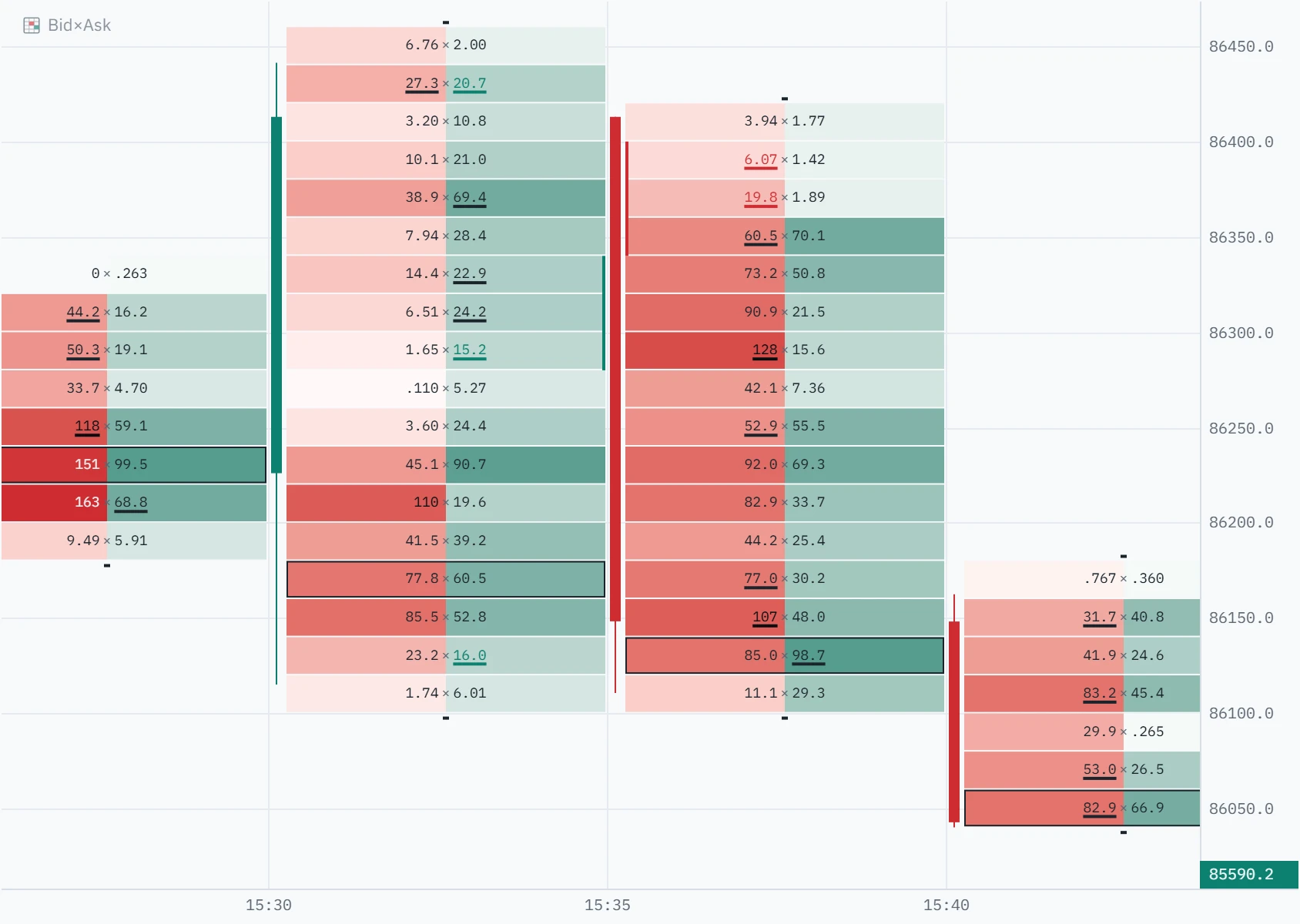
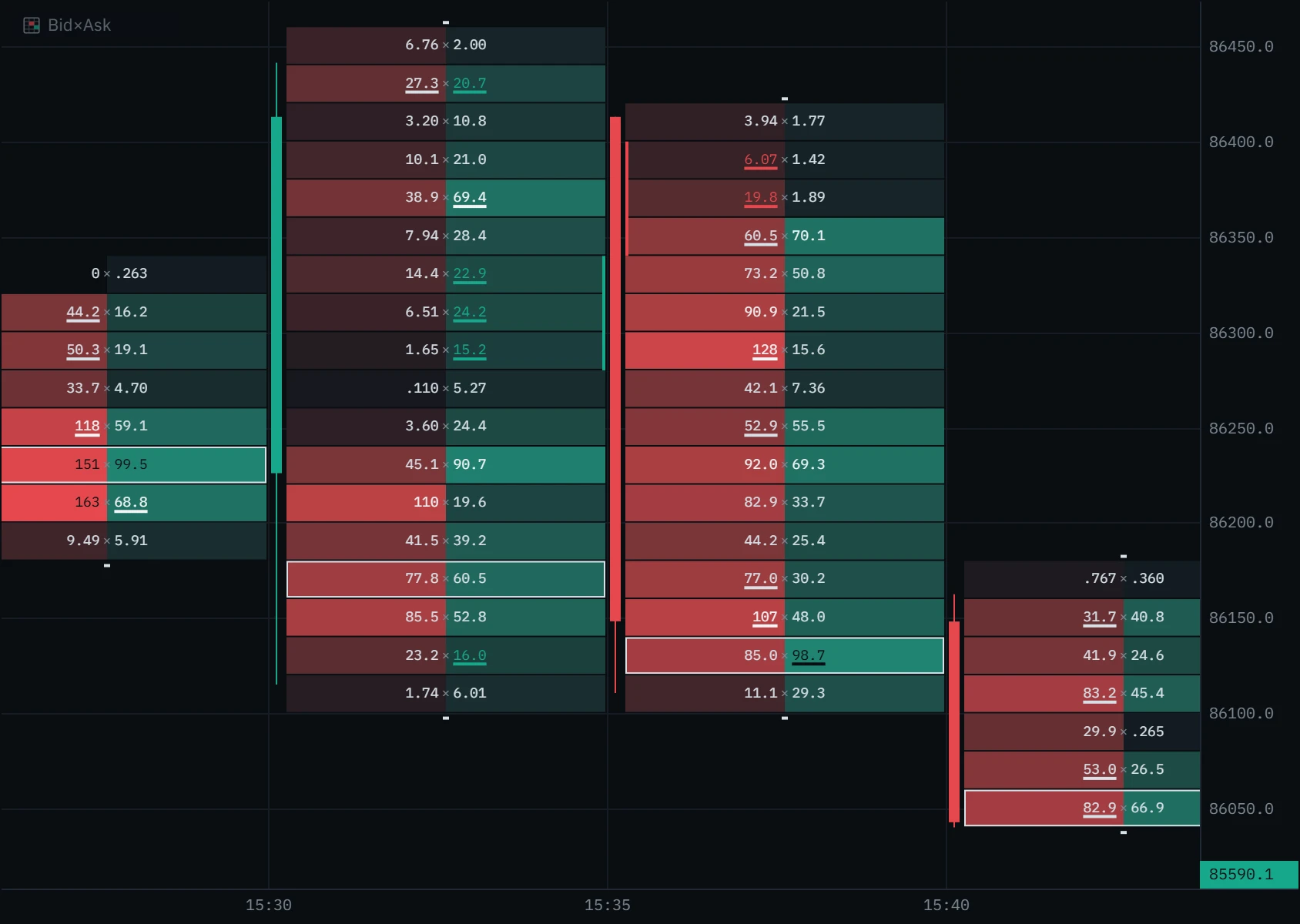
Read each bar from its low to its high. Everything drawn on it is a statement about the trades inside it: learn these seven marks and the rest of the chart reads itself.
Why the imbalance is diagonal
A buyer lifting the offer at a price is meeting sellers who were resting there, one step above the best bid. So Klustra compares the buying at each price with the selling one price step lower, not with the selling at the same price. A price that never traded counts as a real zero, so an imbalance is never drawn across a gap in the ladder.
Imbalances, stacked imbalances, POC and unfinished auctions
What is an imbalance on a footprint chart?
A price where one side overwhelmed the other along that diagonal. Klustra marks a buy imbalance where the market buying at a price is at least 3× the selling one price step lower, and a sell imbalance where the selling is at least 3× the buying one step higher. The figure is underlined. It keeps its side’s colour while that colour can be read on its cell; on the heaviest cells it turns light or dark so the number stays legible, and the underline still marks it. Buying against a price where nothing sold is an imbalance at any ratio.
What is a stacked imbalance?
Three or more imbalances on the same side at consecutive prices. Klustra draws a rail along the bar: green on the right for buyers, red on the left for sellers. Consecutive means neighbouring prices, not neighbouring rows, so two imbalances either side of a price that never traded are two separate signals. Switch on Imbalance stacks to carry each stack right as a zone until price comes back; the stacked imbalance guide covers how to read and trade them.
What is the point of control (POC)?
The price row where the most volume traded in the bar, buying and selling together, drawn with an outline. If two rows tie, the lower price wins, so a bar reads the same whether it was built live or loaded from history.
What is an unfinished auction?
A small dash above a bar’s top row, or below its bottom row, means both sides traded in that extreme row: there is no zero at the edge of the bar. Auction theory reads that as an auction that did not finish, and such extremes are often revisited. The row is the one on your screen, so when you zoom out and a row covers more prices, the mark appears more often.
Footprint chart types: bid × ask, delta, volume and delta profile
The same trades can be printed four ways. Choose one under Cell mode in Footprint settings; the chart redraws at once and keeps your choice. Nothing is recalculated, only drawn differently.
On a phone held upright, two figures per row cannot be read at that width, so the chart steps down on its own, from bid × ask to delta, then volume, then delta profile, and the legend at the top of the chart says what it is drawing: “Bid×Ask · Volume”, for example. Turn the phone sideways and the bid × ask cells come back. Your setting is never changed.
Footprint patterns to look for
None of these is a signal on its own. Each is a question the footprint can answer when price reaches a level you already care about.
Heavy market selling prints at a low, bar after bar, and price does not go lower. Someone is buying everything that is sold into them with resting orders. The aggressive side is spending and getting nothing for it.
- Look for
- Large bid numbers at one price, price holding
- It fails when
- The level trades through on the next push
How to use a footprint chart in trading
A footprint is a magnifying glass, not a map. It is most useful at prices you chose before you looked at it: yesterday’s high, a range edge, a level where price turned before. Away from those, most footprint bars are noise.
Mark your levels on candles first
Use a higher timeframe to decide where a reaction would matter. Draw them with a horizontal line or ray.
Switch to the footprint as price arrives
Drop to a timeframe where each bar holds enough trades to read, often 1m to 5m on BTC.
Ask who is winning at the level
Absorption, a stacked imbalance or an unfinished auction answers that question. Nothing is also an answer.
Decide where you are wrong before you enter
The price that would prove the read false is your invalidation. The long and short position tools size the trade from it.
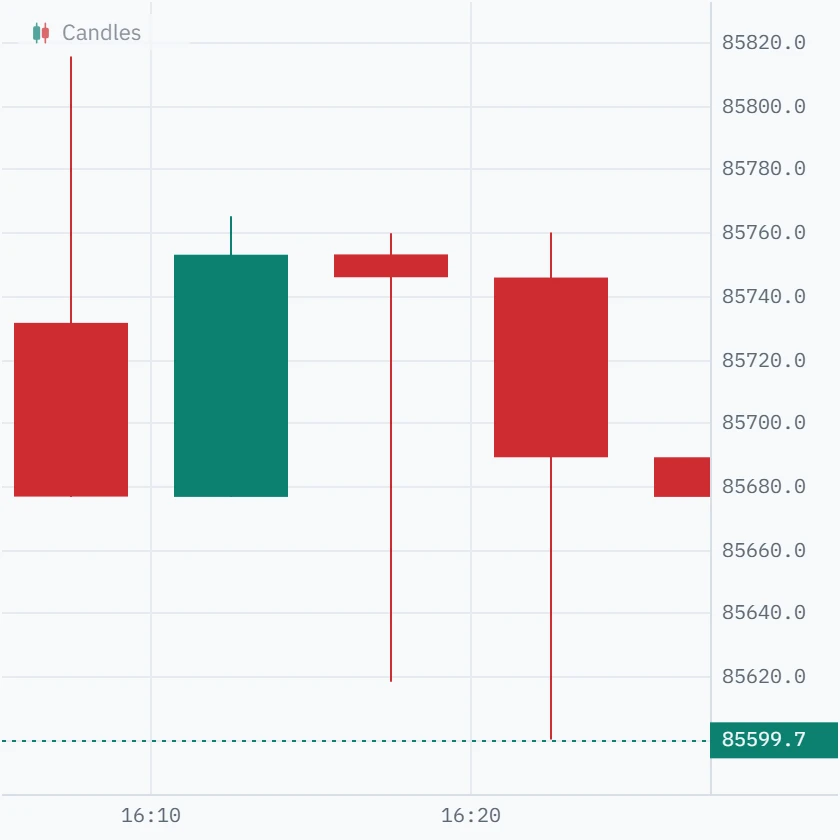
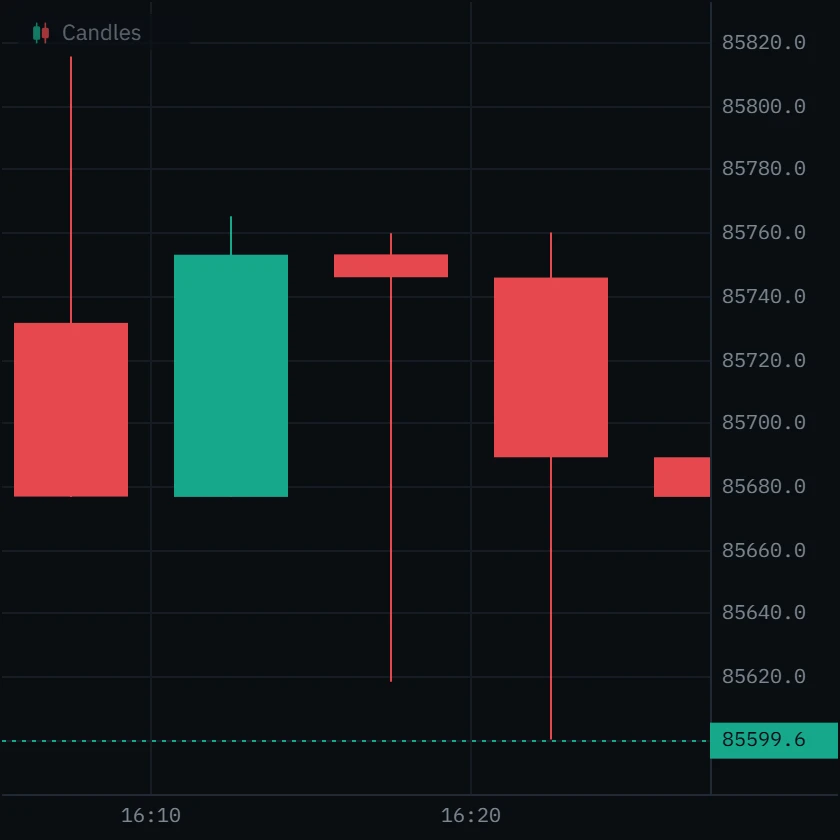
Price fell about 135 dollars inside the bar, to 85,618.2, and closed at 85,745.8, back near where it opened. It looks like a rejection. You can see the drop was refused, not by whom.
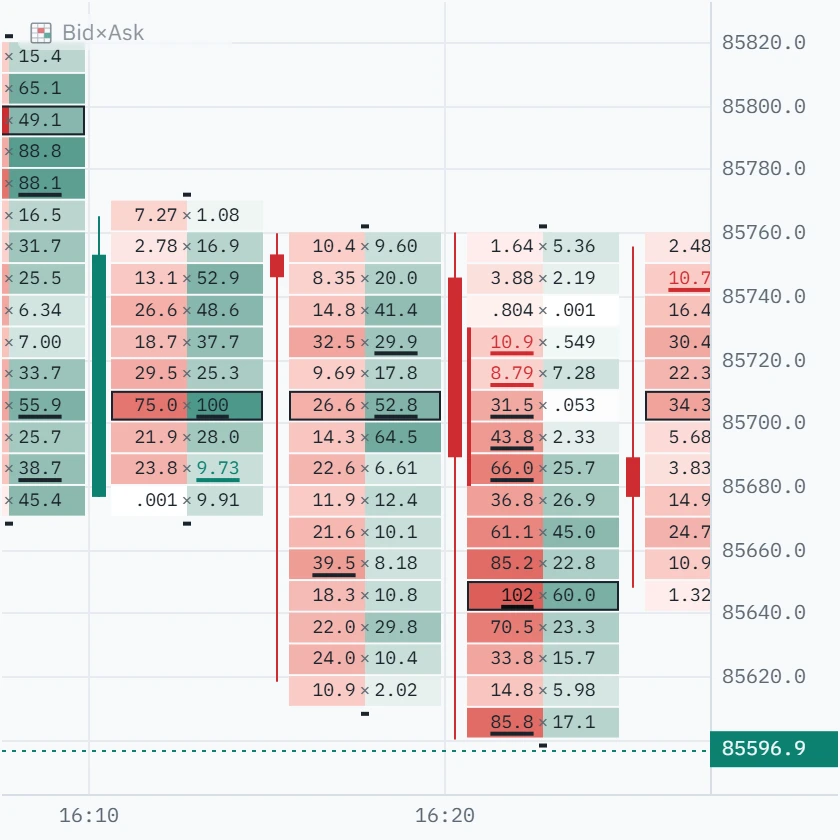
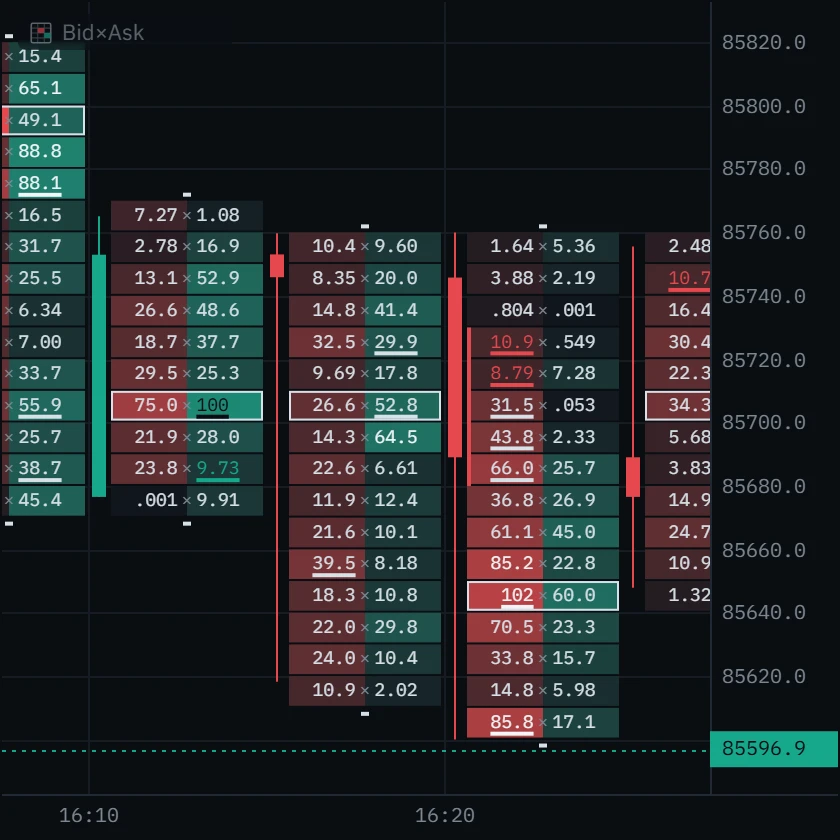
Sellers drove the drop: market selling outweighed the buying at most prices from 85,610 to 85,680, 39.5 sold against 8.2 bought at 85,650 alone. Buyers took the bar back, 64.5 bought at 85,690 and 52.8 at 85,700, its heaviest row. Then the very next bar sold through the low, to 85,600, before closing at 85,689: absorption is a question the next bar answers, not a promise.
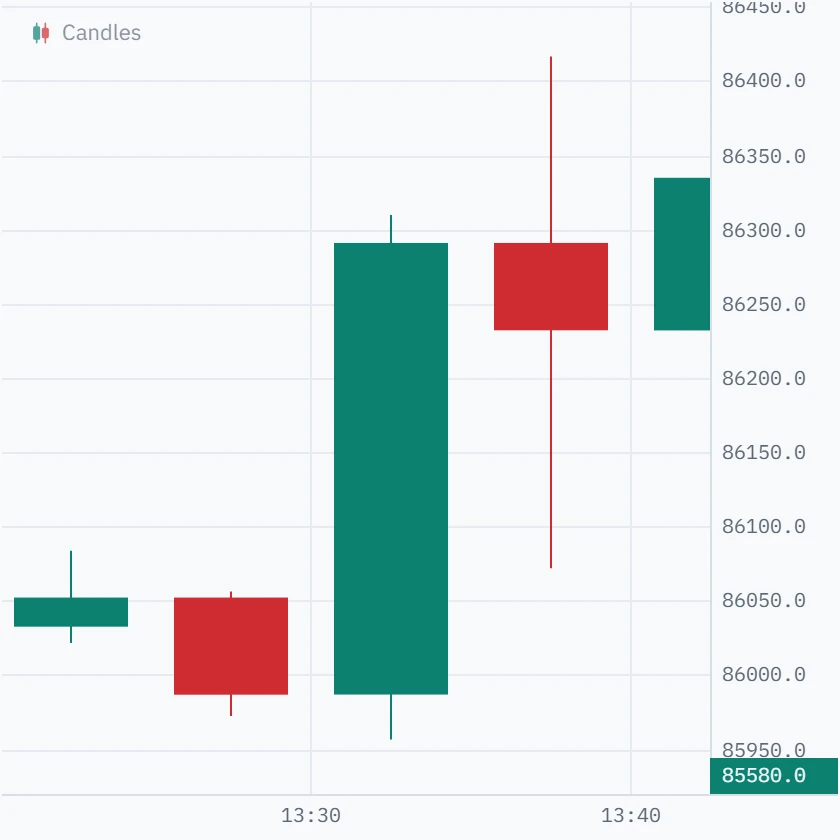
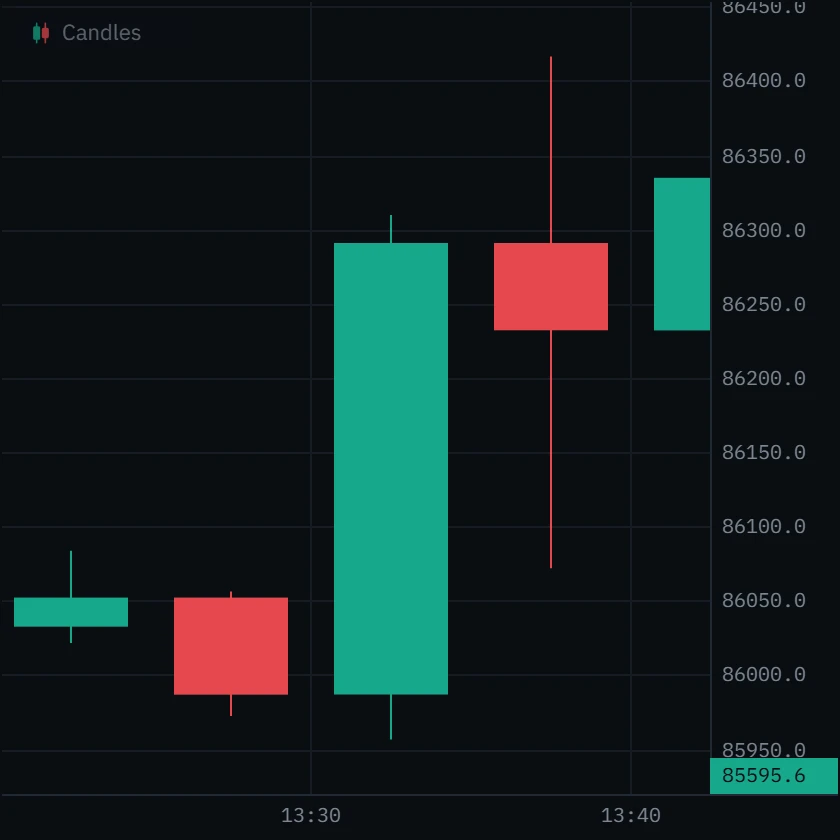
A large green bar, from 85,986.7 up to a close at 86,290.8, a few dollars under its high. It could be conviction, or just an absence of sellers.
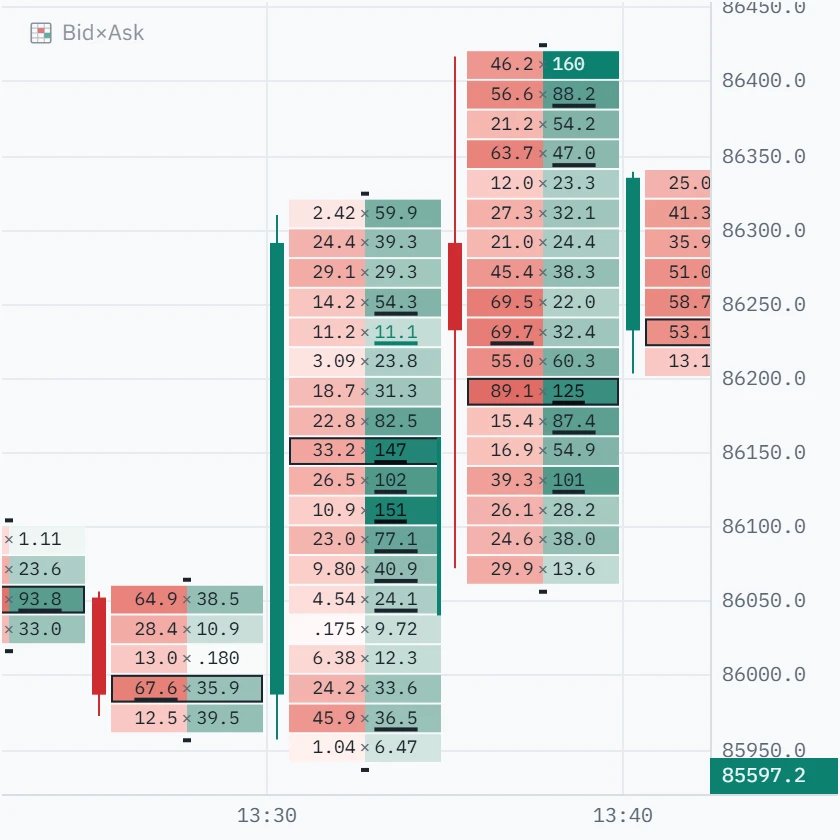
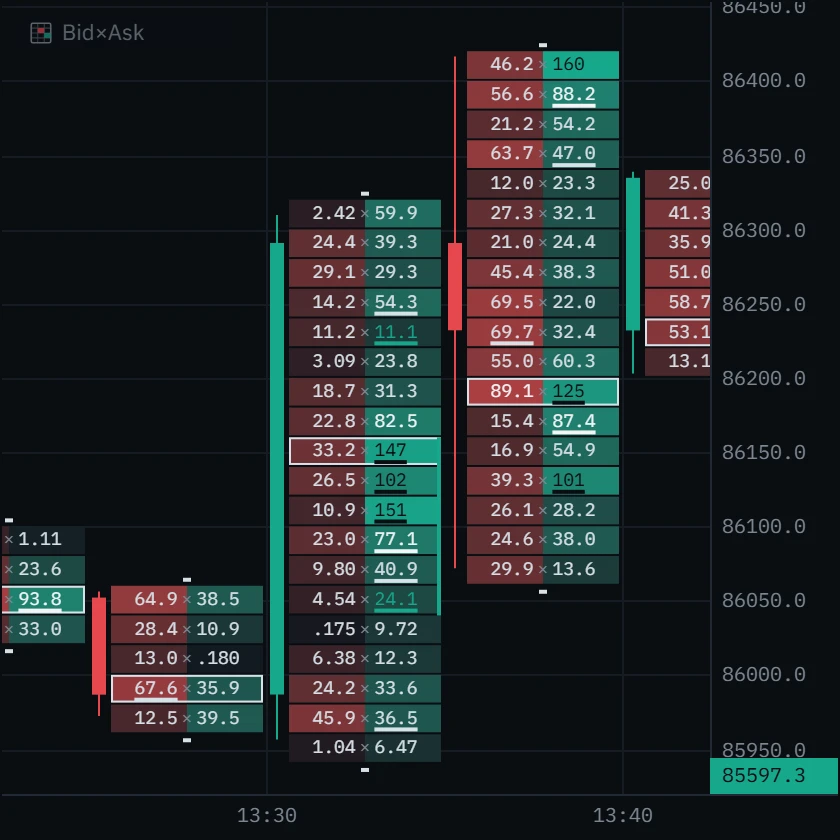
Six buy imbalances stacked from 86,040 to 86,140, with a rail beside them, and the bar’s heaviest row at the top of that run: 147 bought at the offer. Buyers lifted offers price after price, for a delta of +660 in five minutes. This was not just missing sellers.
Real 5-minute bars on the Binance BTCUSDT perpetual, 6 October 2026 (UTC). Each pair is the same bar in both views.
Footprint chart vs candlestick, volume profile and DOM
A footprint is one of several ways to look at the same market, and each answers a different question. They work best together: the DOM ladder shows who is waiting before the trade, the footprint shows who traded, and the delta panel and CVD add the same aggressor split up per bar and over time.
| Chart | What it shows | The question it answers |
|---|---|---|
| Candlestick | Open, high, low and close of each bar | Where did price go? |
| Footprint | Market buys and sells at every price inside each bar | Who pushed it there, and at which prices? |
| Volume profile | Volume at each price over a stretch of bars, without time | Where has the most business been done? |
| DOM ladder | Orders resting in the book at each price, before they trade | Who is waiting, and where? |
Set it up in Klustra
Open the chart
Go to the free chart. No account is needed.
Pick a market
Choose the exchange and the instrument, for example the Binance BTCUSDT perpetual.
Switch the chart type to Bid×Ask
The chart-type switcher in the toolbar turns candles into footprint bars.
Open Footprint settings
Use the gear on the Bid×Ask row at the top left of the chart, or right-click the chart and choose Chart settings…. Pick the cell mode there, and tune the imbalance ratio and the stacked-imbalance minimum.
Zoom to the bars you care about
Bars stop narrowing at the width their numbers need, and rows regroup on their own as you zoom.
On a phone
Turn it sideways for bid × ask cells. Upright, the chart prints one figure per row and the legend names it.
Every setting
| Setting | Default | Range | What it changes |
|---|---|---|---|
| Cell mode | Bid×Ask | Bid×Ask, Delta, Volume or Delta profile | What each row prints. Only the drawing changes. |
| Imbalance ratio | 3 | 1.5 to 10 | How lopsided the diagonal must be to be marked, in steps of 0.5: 3 means 300%. Raise it on busy markets. |
| Stacked imbalance minimum | 3 | 2 to 10 | How many imbalanced prices in a row earn a stacked rail, and an Imbalance stacks zone. |
| Heat normalization | Visible range | Per bar, Visible range or Session | What the shading is measured against: the bar itself, everything on screen, or everything loaded. |
| Show totals row | Off | On or off | Three lines under each bar: its volume, its delta, and how low and how high the delta ran inside it. The delta panel shows more. |
Common mistakes
- Reading every bar. Most footprint bars in the middle of a range say nothing. Read it at your levels.
- Treating a big number as intent. Size shows what traded, not why. One print can be a hedge, a liquidation or a closing order.
- Comparing venues as if they were one market. Each exchange has its own tape. A footprint on one venue shows that venue’s trades.
- Trusting an imbalance on a thin bar. Three lots against one is 300%, and means nothing. Check the volume behind the ratio.
Klustra and other footprint tools
Klustra runs in the browser: there is nothing to install and no account to open, and the live footprint is free with six hours of order flow on seven exchanges. If you are coming from another platform, the comparisons go through what carries over and what does not: Klustra vs Exocharts and Klustra vs TradingLite.
Free and Pro
The footprint and everything drawn inside it are part of the free chart. Pro adds deeper history and the live book and tape tools that go with it.
| Feature | Free | Pro |
|---|---|---|
| Footprint chart (bid × ask) | Included | Included |
| Bid-ask imbalance and stacked imbalances | Included | Included |
| Delta | Included | Included |
| CVD | Included | Included |
| Order-flow history | Last 6 hours | Deep archive, where covered |
| Book heatmap | Not included | Included |
| DOM ladder | Not included | Included |
| Big trades | Not included | Included |
Questions
What is a footprint chart?
A candlestick chart opened up: for every bar it shows the volume traded at each price, split into market sells (on the bid) and market buys (on the ask). It is also called a bid × ask chart, a cluster chart or a numbers bar.
How do you read a footprint chart?
Read each bar from its low to its high. At every price the left number is market selling and the right is market buying. Then look for imbalances, stacked imbalances, the point of control and unfinished auctions, at prices you already care about.
What is the difference between bid and ask volume?
Bid volume is market selling: orders that hit the bid. Ask volume is market buying: orders that lifted the offer. Each trade counts once, on the side of the aggressor.
What is an imbalance in a footprint chart?
A price where market buying is at least 3× the selling one price step lower, or market selling at least 3× the buying one step higher. Three or more in a row make a stacked imbalance. Both numbers are settings.
Is the footprint chart free?
Yes. The footprint, its four cell modes, imbalances, stacked imbalances, the delta panel and CVD are free, with no account. Free order flow reaches back six hours.
Which timeframe is best for a footprint?
One where each bar holds enough trades to read. On BTC that is often 1m to 5m; slower markets need longer bars. Price rows adjust to your zoom on their own.
Can I use a footprint chart on my phone?
Yes, in the browser. Held upright, the chart prints one figure per row, delta or volume, because two do not fit legibly at that width; turn the phone sideways for bid × ask.
Does it work on spot and futures?
Yes, on every supported exchange that offers the market. Coinbase is spot only.
Why do two exchanges show different footprints for BTC?
Because they are different markets with their own trades. A footprint shows one venue’s tape exactly as that venue published it.
Related tools
See it on a live market.
Open a supported market and switch the tool on. The footprint, delta, CVD and imbalances are free, with no account.
Order flow shows what traded, not what will trade next. Nothing on this page is financial advice, and trading carries a real risk of loss.