
A DOM ladder shows the orders that are waiting to trade: how much is resting on the bid and the offer at every price, updated as the exchange changes them. A footprint tells you what already traded. The ladder tells you what would have to be bought or sold to move price through the next few levels.
What a DOM ladder is
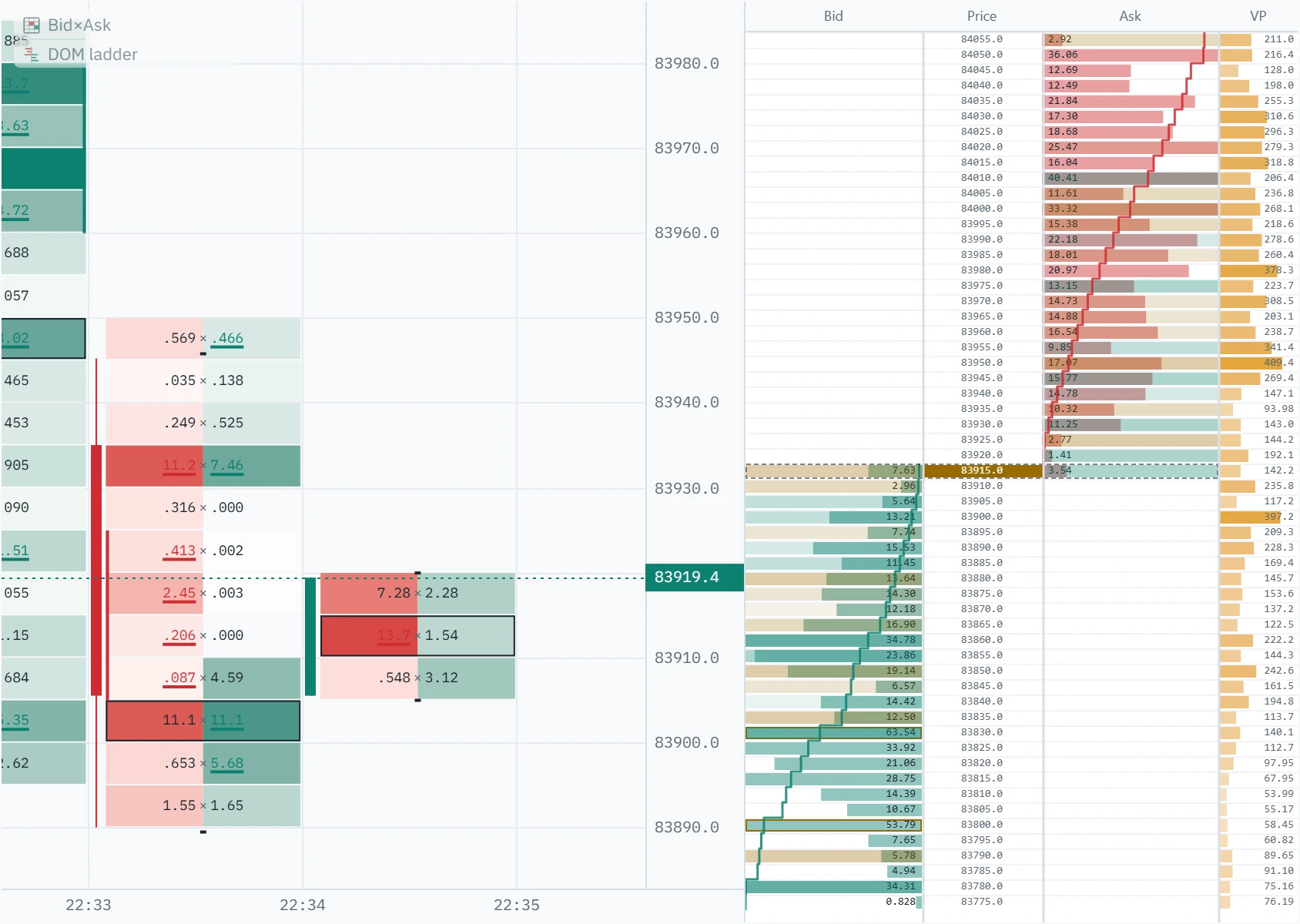
An exchange order book is two queues: limit orders waiting to buy below the market, and limit orders waiting to sell above it. A DOM ladder — depth of market, price ladder, order book ladder — draws those queues vertically, one row per price, with the market in the middle. Resting bids run down the left, resting offers up the right, and the numbers change every time someone adds, cancels or gets filled.
That is a different question from the one a chart answers. A candle, a footprint and a volume profile are all made of trades that happened. The ladder is made of orders that have not happened yet, and most of them never will: they are cancelled, moved, or left to be filled another day. It is the only view in Klustra that shows the market’s intentions rather than its history — with all the caveats that word deserves.
How Klustra builds it
Your browser opens the exchange’s own depth stream directly. The exchange sends one snapshot of the book and then a diff every time a price level changes; a Web Worker keeps the book from those diffs and hands the panel only the rows it can currently draw. Nothing about the live book passes through a Klustra server, and nothing is smoothed or sampled on the way: the size on a row is the size the exchange published for that price.
Rows are the chart’s price grid — the instrument’s tick size multiplied by the tick grouping you are looking at — so a ladder row covers exactly the same band as the footprint row beside it, and several exchange price levels can sum into one row. Both sides are placed on the same grid, which is why the band holding the spread often shows resting bids and resting offers at once.
The book is available on all seven exchanges Klustra connects to: Binance, Bybit, OKX, Bitget, Gate.io, Hyperliquid and Coinbase (spot only). How far it reaches is the venue’s decision, not ours — some stream the whole book, others a fixed number of levels around the spread. Scroll past where the feed’s knowledge ends and the ladder prints a dash rather than an empty row, because “nobody is resting here” and “we were never told” are not the same answer.
Anatomy of the ladder
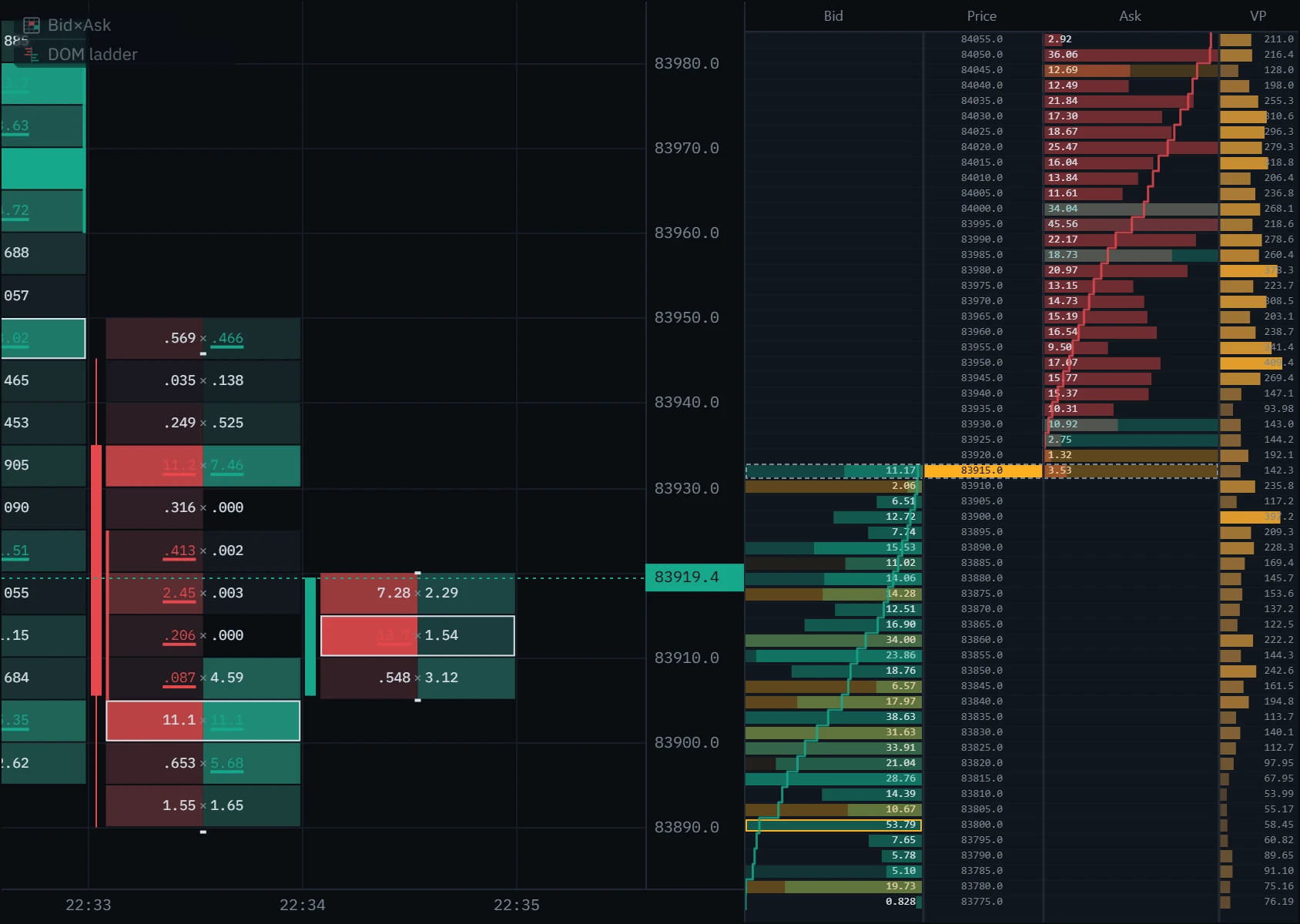
Eight marks, and the panel reads itself. Open each one on the picture below.
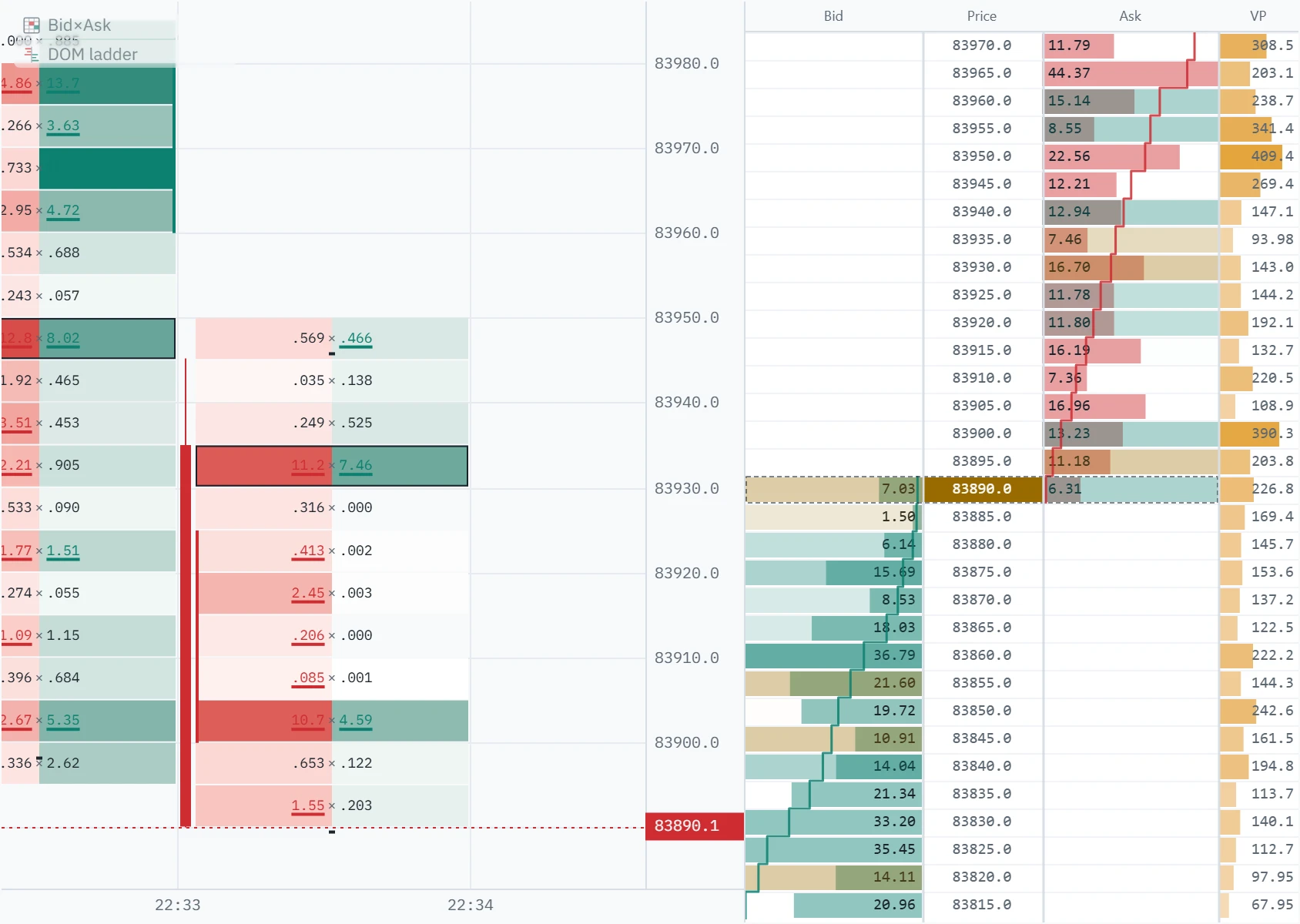
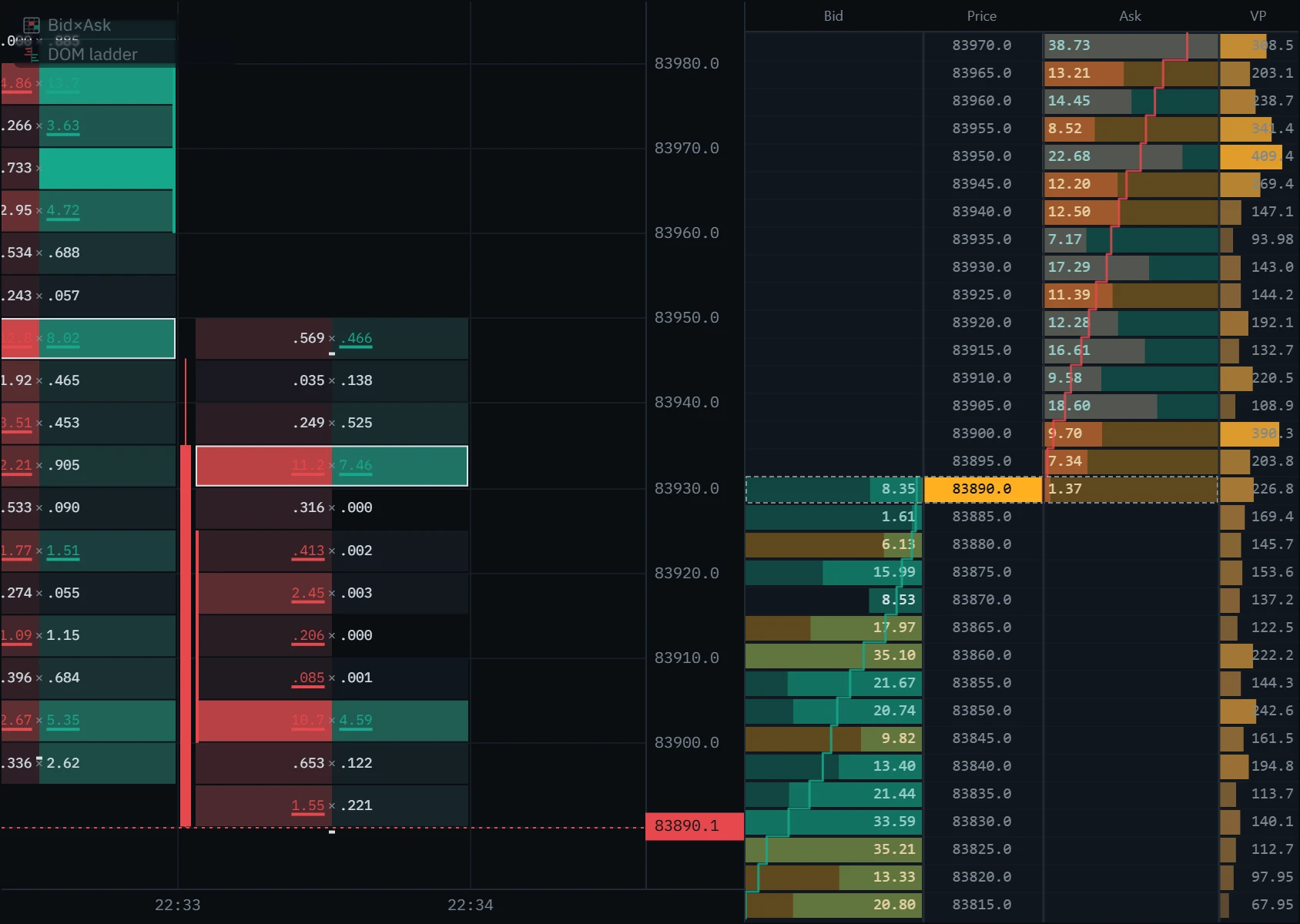
There is a ninth mark that is not in the picture, because it was not true at that moment: a row holding several times the typical resting size is outlined. That is the ladder calling a wall, and on a book as even as this one there was nothing to call. There are two in the Dense rows tab below. The comparison is against a typical order near the market — not against the biggest row on screen, which one wall would flatten every other bar against.
Three ways to set it up
The same book, with different things asked of the panel. Every one of these is a switch or a slider in the ladder’s settings.
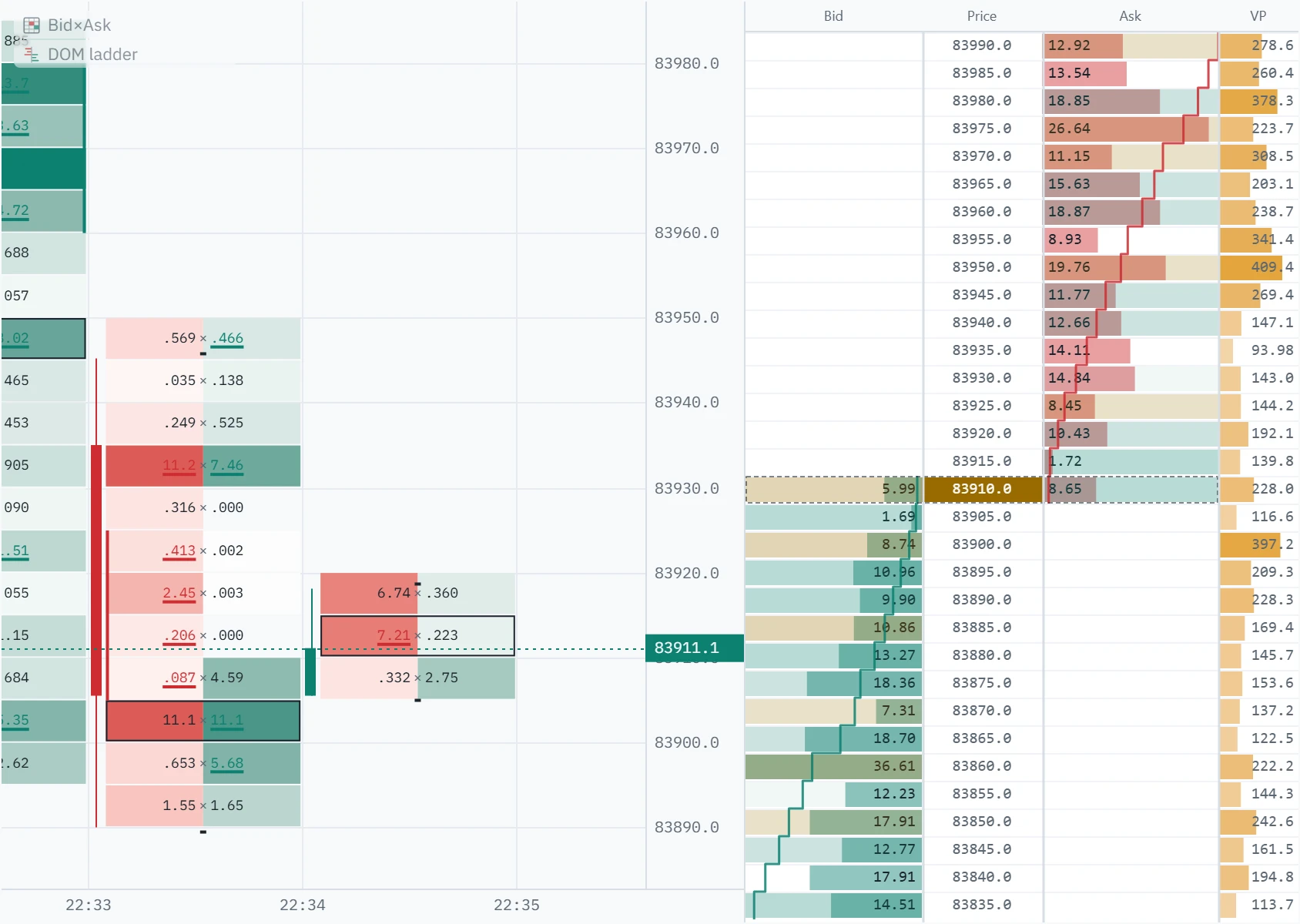
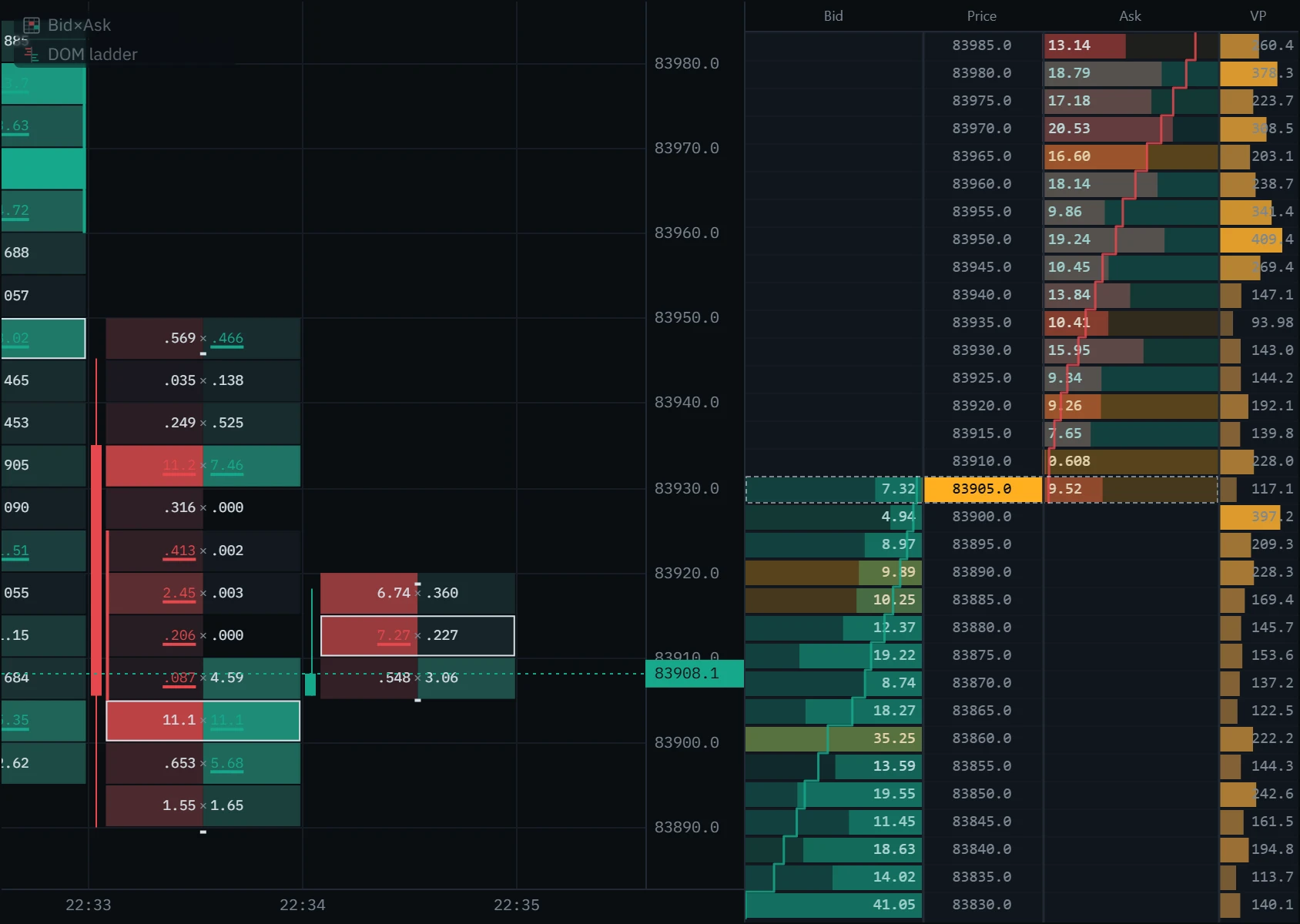
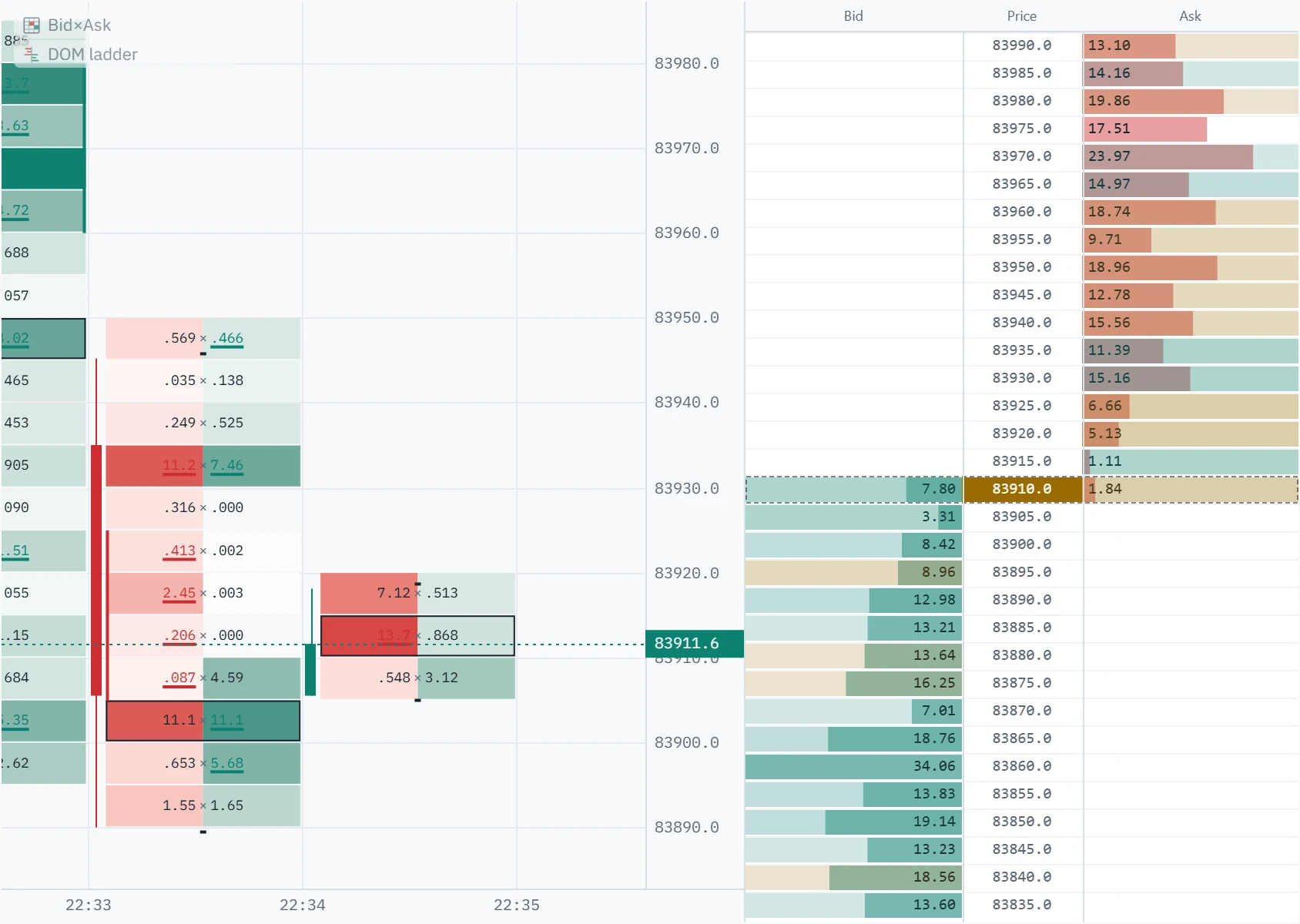
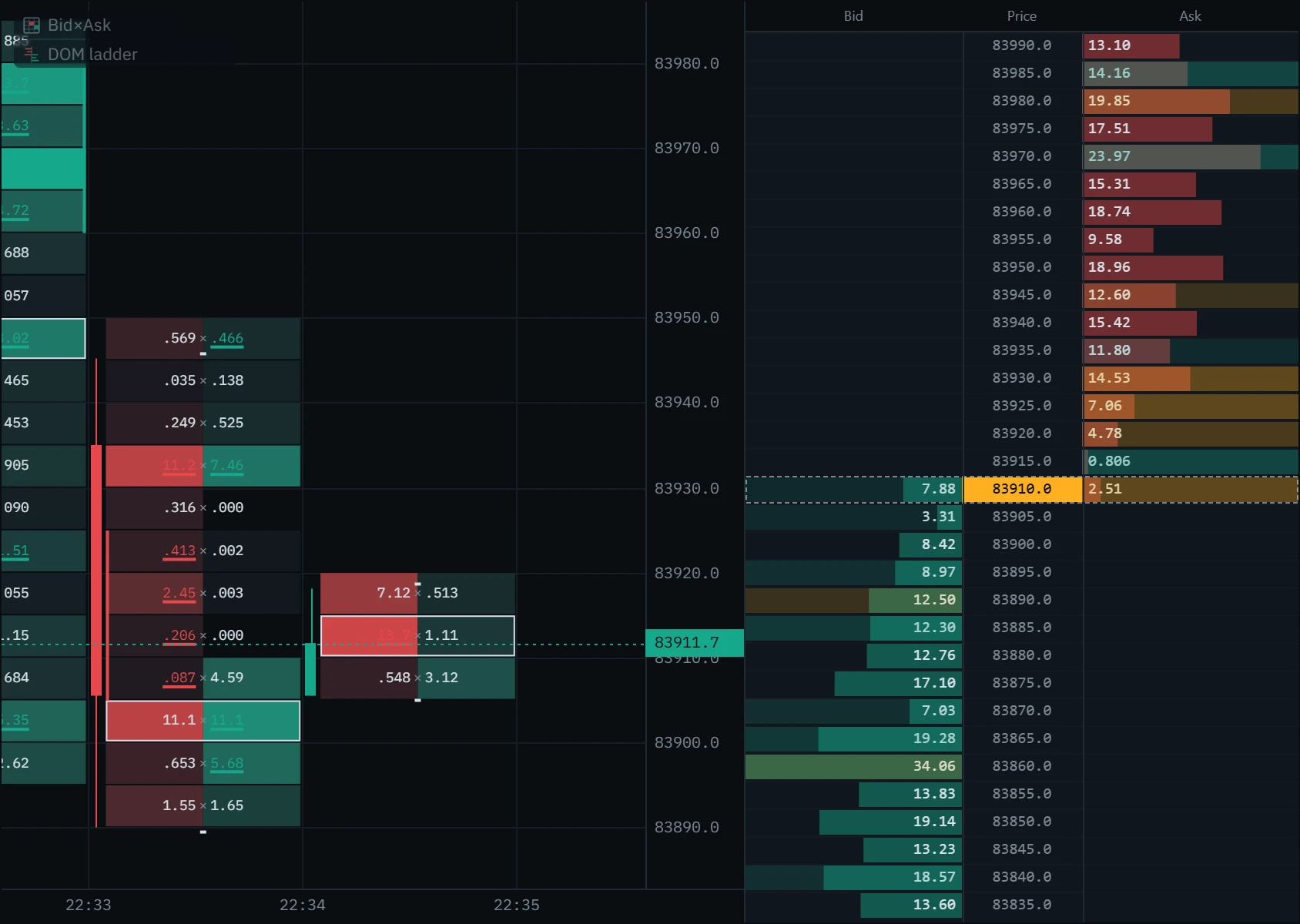
Four things to look for
The book is the most easily faked data on an exchange. None of these is a signal on its own; each is a question worth asking when price is approaching a level you already care about.
One row holding many times what its neighbours hold, outlined by the ladder. It is a price someone is willing to defend — or wants you to think they will. A wall that sits well away from the market costs nothing to show and is often withdrawn before price reaches it.
- Look for
- An outlined row, and how close price is to it
- It means nothing when
- It is far away and has never been tested
Using it in your trading
The ladder is a short-horizon tool. Resting orders describe the next few seconds to minutes, not the next session — anything further out can be cancelled a hundred times before price gets there. Use it to time and to place, not to decide direction.
Choose the level on the chart, not on the ladder
Decide where a reaction would matter using candles, the footprint or a volume profile. The ladder is for what happens when price gets there.
Watch the level, not the whole book
Scroll the ladder to your price and it pins there, so the rows stop sliding under you as the market moves. A chip shows the live price and takes you back.
Ask whether the size is real
Size that trades and refills is being defended. Size that vanishes on approach was never for sale. The difference is the flash and the tape, not the number.
Use the thin patches for your stop
A stop just past a thin stretch is a stop that gets run cheaply. The cumulative curve shows you where the book would put up a fight.
Confirm against what traded
The volume-at-price column and the footprint say whether a level has ever been tested. A wall at a price nothing has traded at is an opinion, not a record.
Set it up in Klustra
Open the chart
Go to the chart and choose an exchange and instrument — for example the Binance BTCUSDT perpetual.
Switch the ladder on
Open Indicators in the toolbar and pick DOM ladder under Order flow. It docks between the chart and the sidebar, and below the chart on a phone.
Give it height
The taller the panel, the deeper the book it asks for. On a short window, reduce the row height instead.
Scroll, and come back
The wheel, a drag, the arrow keys and Page Up / Page Down all move the ladder; it pins where you leave it. Double-click, Home or Escape returns it to the live price, as does the chip.
Tune the big-order multiple
Open the ladder’s settings from the gear beside it in the Indicators list. On a deep book raise the multiple until only the rows you would call walls are outlined.
Every setting
| Setting | Default | Range | What it changes |
|---|---|---|---|
| Row height | 18 px | 10 to 32 px | How tall one price row is — and so how many rows fit, and how much book the ladder requests. |
| Ladder width | 240 px | 180 to 360 px | How wide the panel is. Below about 210 px the volume-at-price column is dropped so the two sides keep their room. |
| Big order (× median size) | 4× | 2× to 20× | How many times the typical resting size near the market a row must hold to be outlined. |
| Show volume at price | On | On or off | The fourth column: session volume traded at each price, on the ladder’s rows. |
| Highlight big orders | On | On or off | The outline on rows above the multiple above. |
| Flash placed / pulled orders | On | On or off | The half-second tint on rows that were just added to, or taken from. |
| Show cumulative depth | On | On or off | The step curve of running resting size out from the spread. |
| Follow the chart’s price scale | Off | On or off | Centres the ladder on what the chart is showing instead of on the last trade. A manual scroll still wins over both. |
Common mistakes and limits
- Treating the book as a promise. A limit order is free to cancel and most are. Size on the ladder is an offer to trade, not a commitment to.
- Reading a wall far from price. The further from the market, the cheaper it is to show size that will never be there when it matters.
- Forgetting what is hidden. Iceberg and reserve orders show only a slice of themselves, so a thin row can absorb far more than it advertises. The book cannot show you what is not displayed.
- Comparing venues as one market. Each exchange has its own book. Depth on one venue says nothing about depth on another, and a wall on the smaller of two is easier to fake.
- Using it to pick direction. The ladder is about liquidity, over seconds. Direction is a question for the chart.
Free and Pro
The DOM ladder is part of Pro, with the rest of the live book and tape tools. The chart itself, the footprint and everything drawn inside it stay free.
| Feature | Free | Pro |
|---|---|---|
| DOM ladder | Not included | Included |
| Book heatmap | Not included | Included |
| Big trades | Not included | Included |
| Flow tape | Not included | Included |
| Speed of tape | Not included | Included |
| Footprint chart (bid × ask) | Included | Included |
| Order-flow history | Last 6 hours | Deep archive, where covered |
Questions
What does DOM mean?
Depth of market: how much is waiting to be bought and sold at each price away from the current one. The panel that draws it is called a ladder, a price ladder or an order book ladder.
What is the difference between a DOM ladder and a footprint chart?
The ladder shows orders resting now and is gone the moment they change. The footprint shows trades that already happened and stays on the chart. One is the intention, the other is the record — which is why the ladder carries a volume-at-price column showing both at once.
How deep does the ladder go?
As deep as the panel can draw. It requests exactly the rows it can show, so a taller panel or a smaller row height means a deeper book. Beyond what the exchange publishes, rows are marked with a dash instead of being left blank.
Can I trade from the ladder?
No. Klustra is an analysis tool and never places an order, so there are no buy and sell buttons. Bar replay is where you practise execution, against historical bars.
Is the order book reliable?
It is exactly what the exchange published, and exactly as reliable as resting orders are — which is to say size can be withdrawn at any moment, and often is. Watch whether size trades and refills before you trust it.
Does it work on every exchange?
Yes, on all seven Klustra connects to, spot and perpetual, with Coinbase spot only. How many levels the feed carries is the venue’s decision.
Why do both the bid and the ask columns show a size on the same row?
Because a row is a price band, not a single tick, and when the spread falls inside one band that band holds resting orders on both sides. The two are counted separately and never mixed.
Related tools
See it on a live market.
Open a supported market and switch the tool on. The footprint, delta, CVD and imbalances are free, with no account.
Order flow shows what traded, not what will trade next. Nothing on this page is financial advice, and trading carries a real risk of loss.