
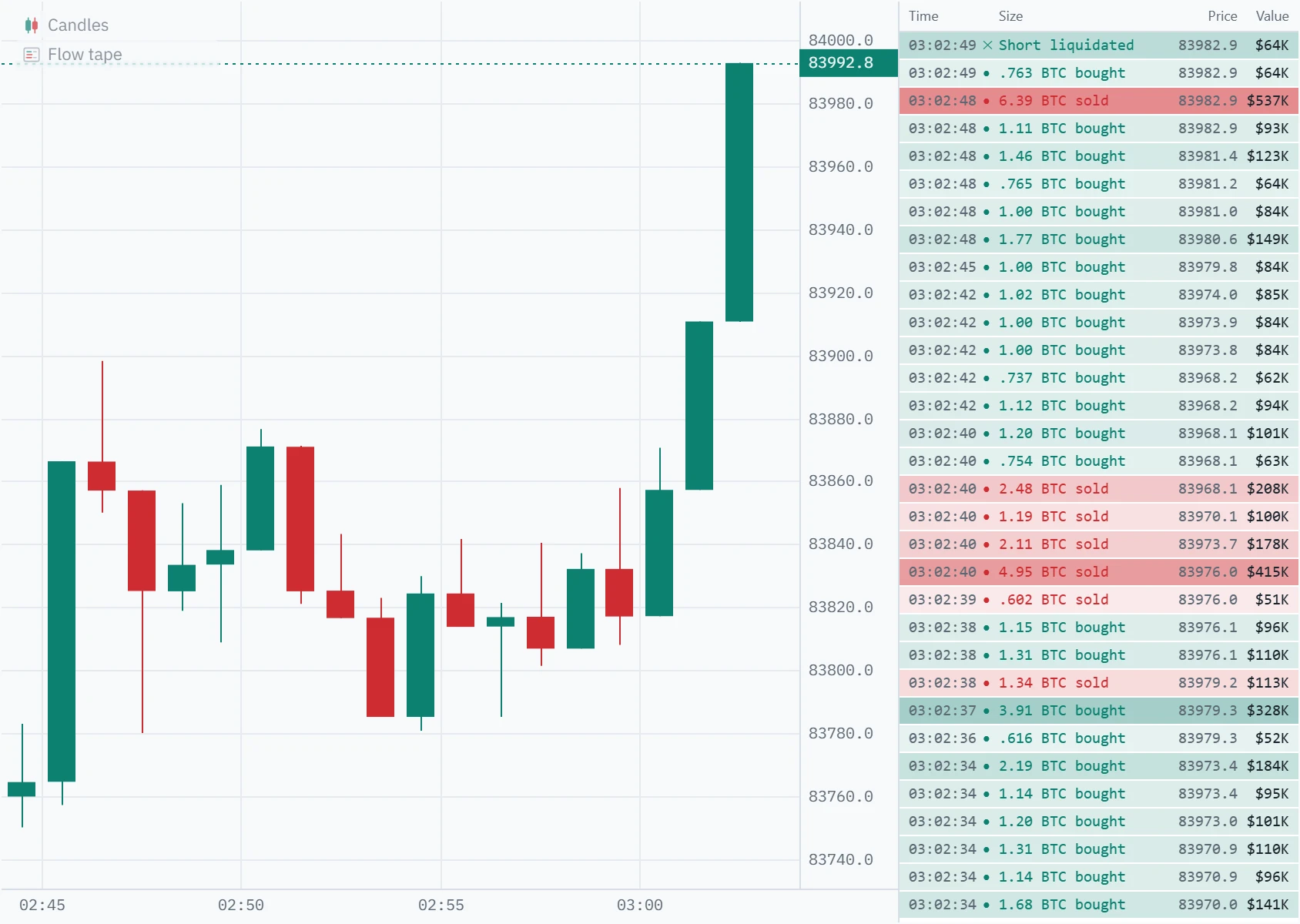
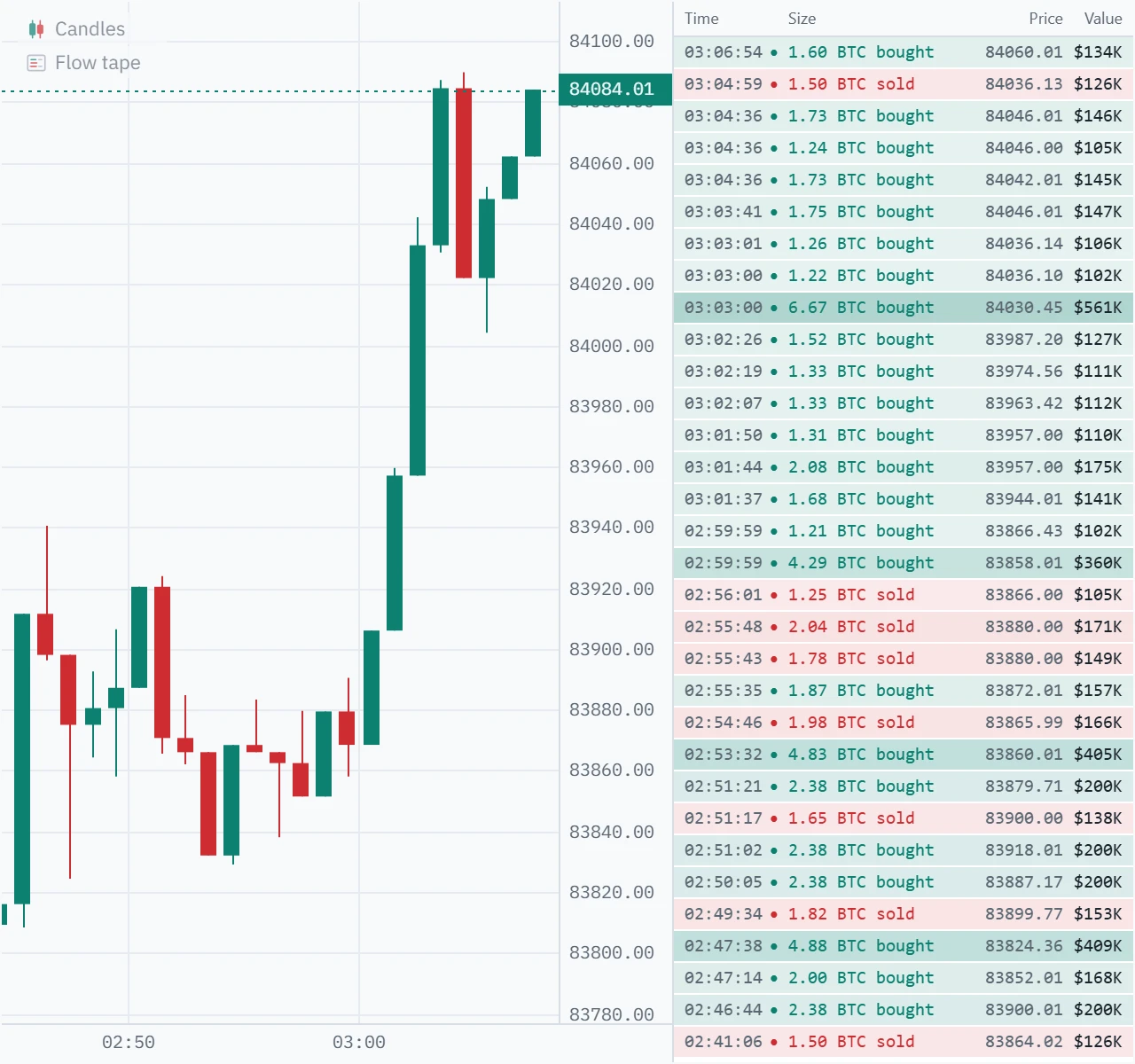
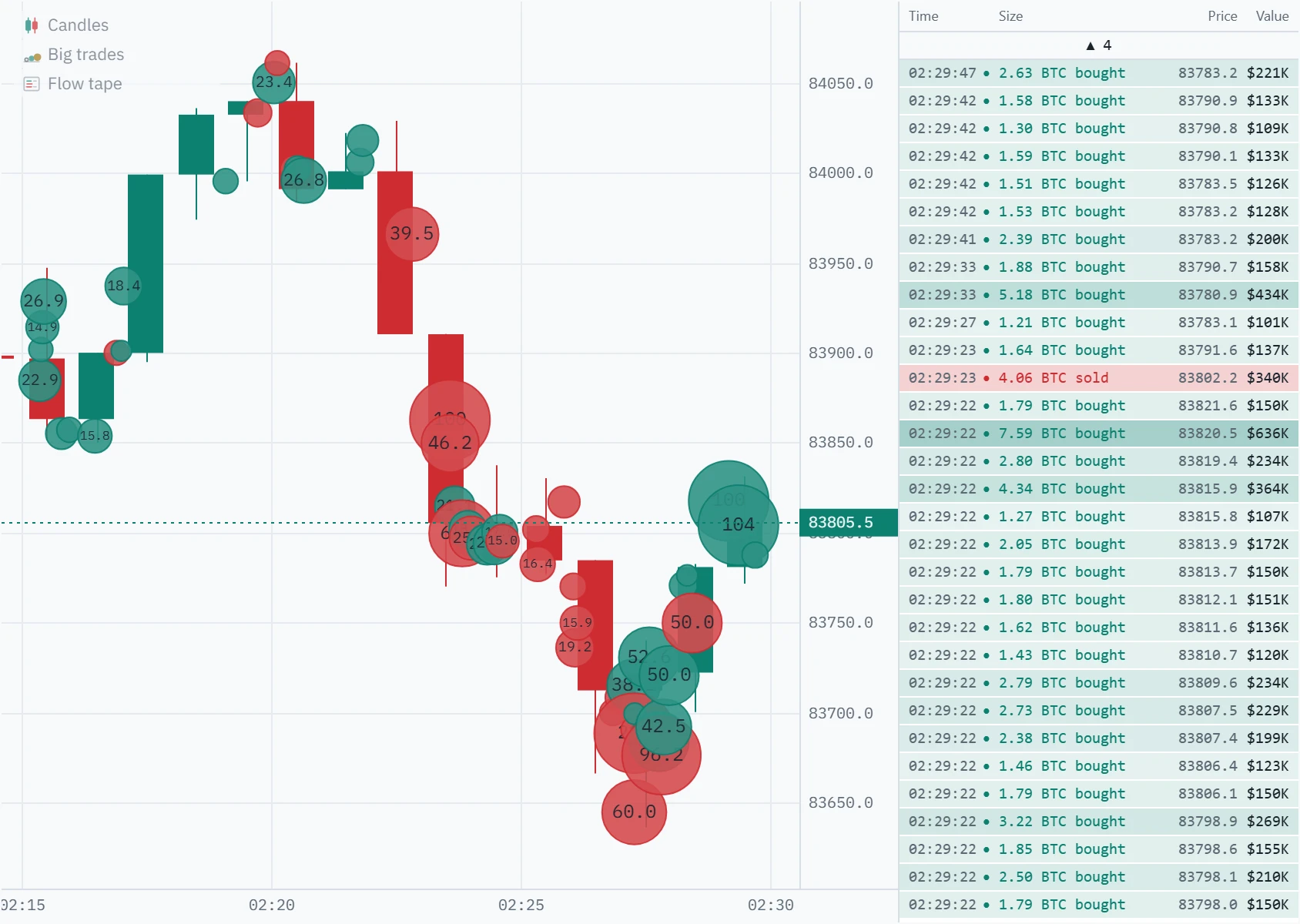
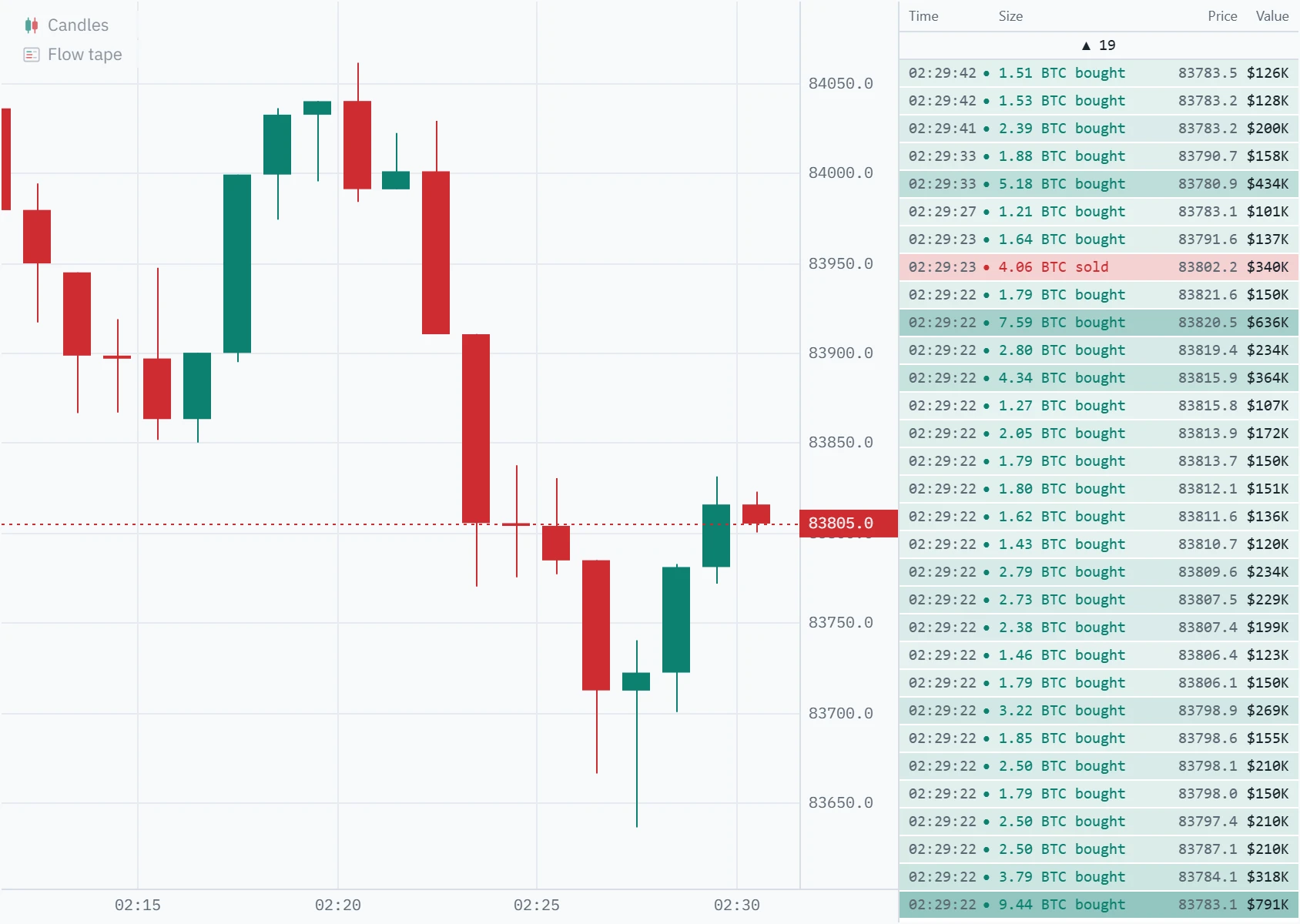
The flow tape is a time and sales list filtered by dollar value. It shows every trade worth more than an amount you choose, and the liquidations the exchange publishes, newest first, the moment they print. Each row says when it traded, how much, at what price and what it was worth, coloured by the side that crossed the spread.
What is the flow tape?
Every exchange publishes a record of its trades: the tape, or time and sales. Each trade is a resting order meeting an aggressive one, and the exchange marks which side was the aggressor, the one that bought at the offer or sold at the bid. Reading that record as it prints is called tape reading. It is the oldest form of order-flow analysis, and on a busy crypto market it is also unreadable: the Bitcoin perpetual on Binance printed more than 60,000 trades an hour at times on 7 October 2026.
The flow tape keeps the part worth reading. It lists only the prints worth at least your floor, $100,000 unless you change it, and puts the liquidations in the same list: positions the exchange closed by force, which on a leveraged market are often the reason a move speeds up. Other platforms call similar tools a large trades feed, a whale tape or a large lot filter.
How does the flow tape work?
Your browser opens the exchange’s public trade stream directly, and a Web Worker reads every print: the same tape the footprint and the delta panel are built from. A print reaches the list if its value, price times size, is at least your floor. Nothing is grouped, averaged or estimated. A row is one trade as the exchange published it, so its size, price and time can be looked up on the exchange.
Why a dollar floor instead of a size filter
Most time and sales filters count coins. A coin filter means something different on every symbol, and it drifts as price moves: with Bitcoin at $120,000 a 2 BTC filter catches prints of $240,000 and up, at $85,000, where it traded on 7 October 2026, prints of $170,000. A dollar floor means the same amount of money on every symbol and at every price, which is what lets one tape be read on Bitcoin, Ether and a small altcoin alike.
What one row is
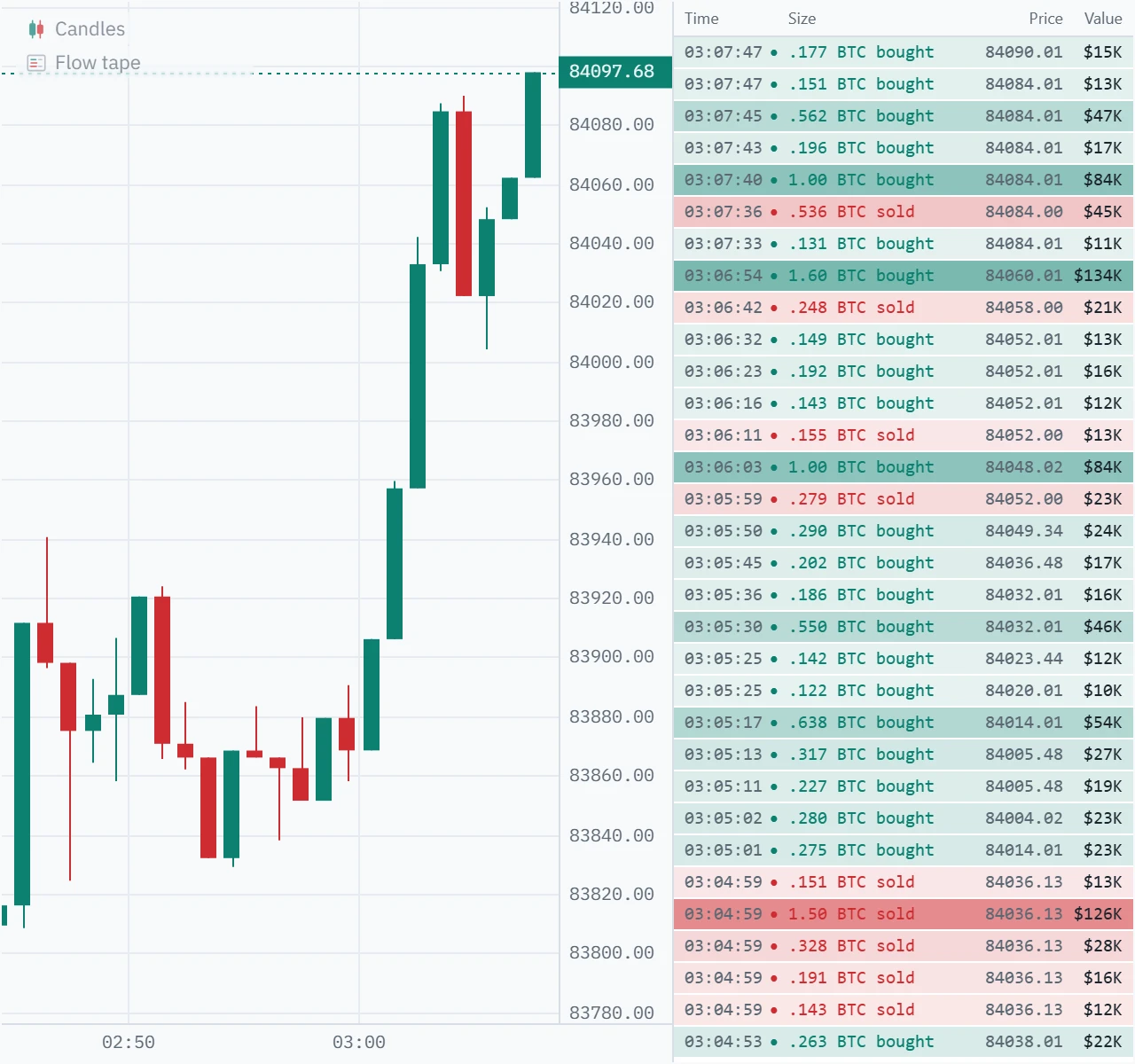
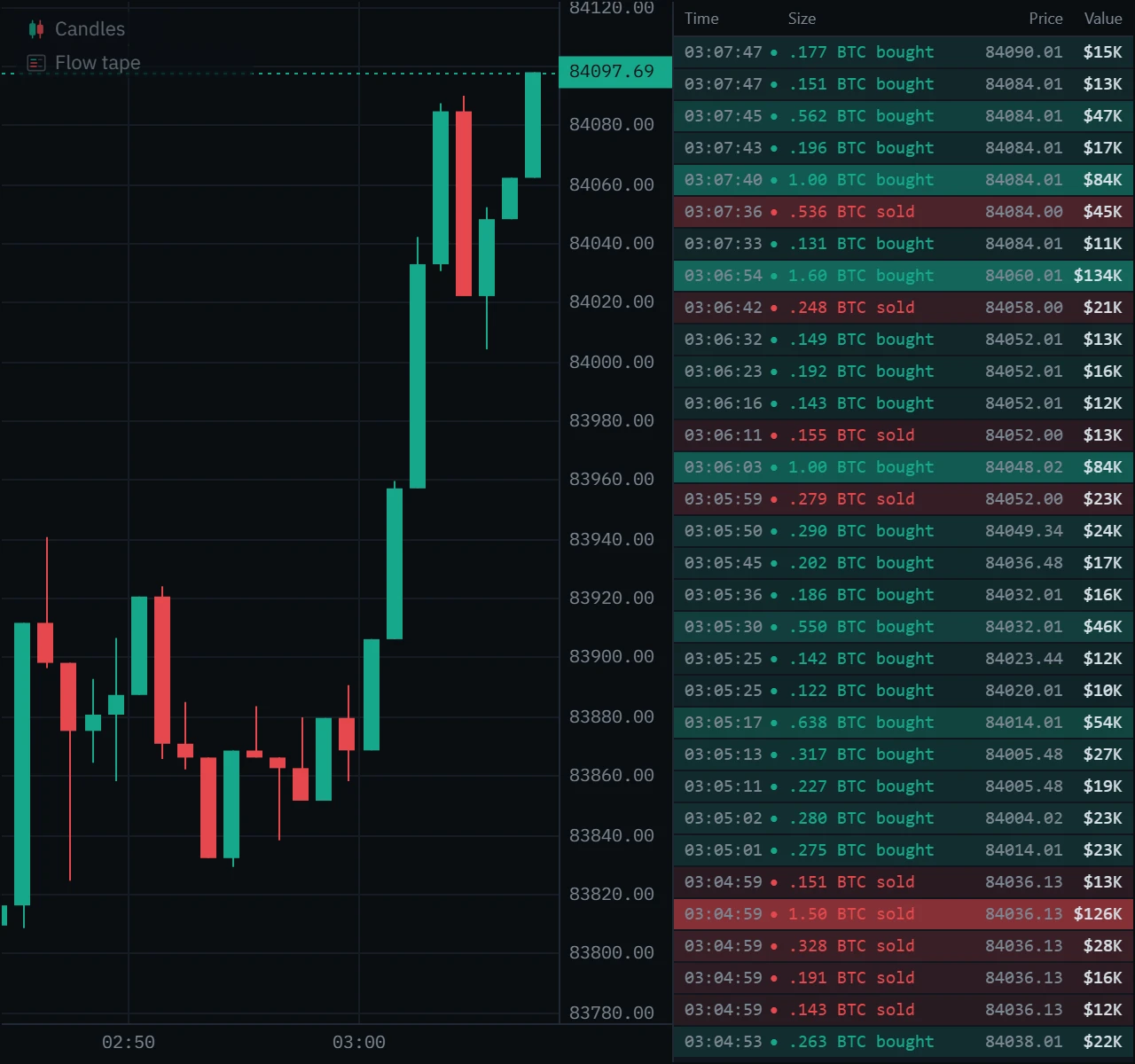
Exchanges do not all cut their tape the same way. On Binance one row is an aggregate trade: the fills of one aggressive order at one price, added together. An order that sweeps five prices prints five rows, each with its own price, usually stamped in the same millisecond. Other venues publish each fill against each resting order, so the same order arrives as more, smaller rows, some of which may fall under your floor. To see whole orders, use big trades, which groups the prints of each burst into one bubble.
Where the liquidations come from
Liquidations exist only where there is leverage, so they appear on perpetual futures charts on the three venues that publish them: Binance, Bybit and OKX. A spot chart, and Bitget, Gate.io, Hyperliquid and Coinbase, list prints only. Klustra records liquidations while a chart on that perpetual is open, whichever tools are on, and keeps them in your browser for a day; no exchange sells a history of them. One limit is the exchange’s own: Binance publishes at most one liquidation per symbol each second, the latest, so in a fast cascade some forced orders never reach any public feed.
A liquidation row is a cascade: same-side liquidations within the Liquidations tool’s cluster window of the first one, half a second by default, are added together, and the row shows their total value at their size-weighted average price. A long that was liquidated is a forced sell hitting the bid, so its row is red; a liquidated short is a forced buy, and green.
| On the tape | What it is |
|---|---|
| Time | When the print traded, to the second, in the chart’s time zone. |
| ● or ✕ | A dot for a trade, a cross for a liquidation, in the side’s colour. |
| Size | “6.45 BTC bought”: the size in the asset, rounded to three figures, and the side that crossed. A liquidation says “Long liquidated” or “Short liquidated”. |
| Price | The price it traded at; for a cascade, the average price of its forced orders. |
| Value | Price times size, in dollars: the column the floor is tested on. |
| Depth of colour | How far the value is above your floor, up to ten times it. A liquidation row starts deeper than a trade of the same value. |
| A row sliding in | A print that just arrived. The rows below make room for it. |
How far back it goes
Prints reach the list the moment they trade, before the chart has finished loading its history. The history then fills in behind them, as far back as the chart holds the individual trades: about half a million of them, which was more than six hours of the Bitcoin perpetual on the quiet morning of 7 October 2026 and three and a half hours on the busy afternoon of 2 October. The panel keeps the 200 newest rows, and you can scroll back through all of them. At $100,000 that was about half an hour of the Bitcoin perpetual on a quiet morning, and a few minutes during a sell-off.
How accurate it is
We checked the tape against Binance’s own trade record before writing this page, on 7 October 2026. On the Bitcoin perpetual, in three windows (the five minutes the chart opened in, a stretch of history re-filtered when the tape was switched on, and a stretch the chart fetched in the background), each of the 146 prints worth $100,000 or more matched Binance’s record by trade id, time, price, size and side, with nothing missing, nothing extra and nothing listed twice. After the fixes below we checked again at a $1,000 floor: 2,756 of 2,756 prints matched, including the minute the chart opened in. The liquidation rows matched each exchange’s own liquidation feed, recorded separately: 16 of 16 cascades on Bybit and 7 of 7 on Binance. The check also changed the tool. Rows printed your computer’s clock instead of the chart’s time zone; moving the floor re-filtered a smaller copy of the tape, so older rows vanished; columns ran into each other on a narrow panel, at a large text size or on long prices; Coinbase rows read “BTC-”; $999,600 read “$1000K”; cascades were cut short on a computer whose clock runs fast; the floor could not be set to $100,000 or $25,000 exactly; prints stamped in the same millisecond, the fills of one sweep, were listed oldest first; and the list could not be scrolled. For every tool on the chart, a trade the bars had refused could stop a thin market such as Hyperliquid’s gold from loading at all. All of it is fixed.
How to read the flow tape
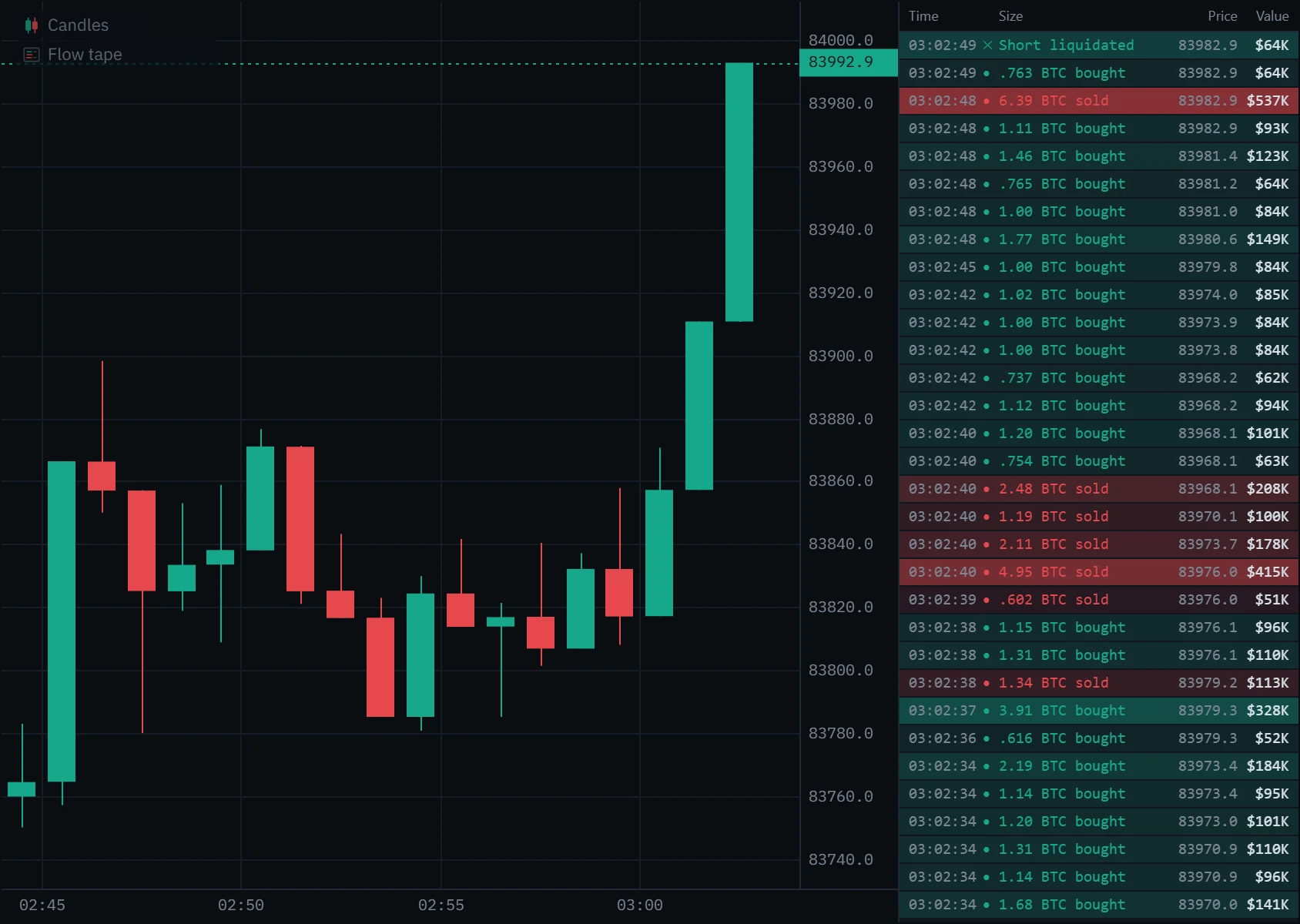
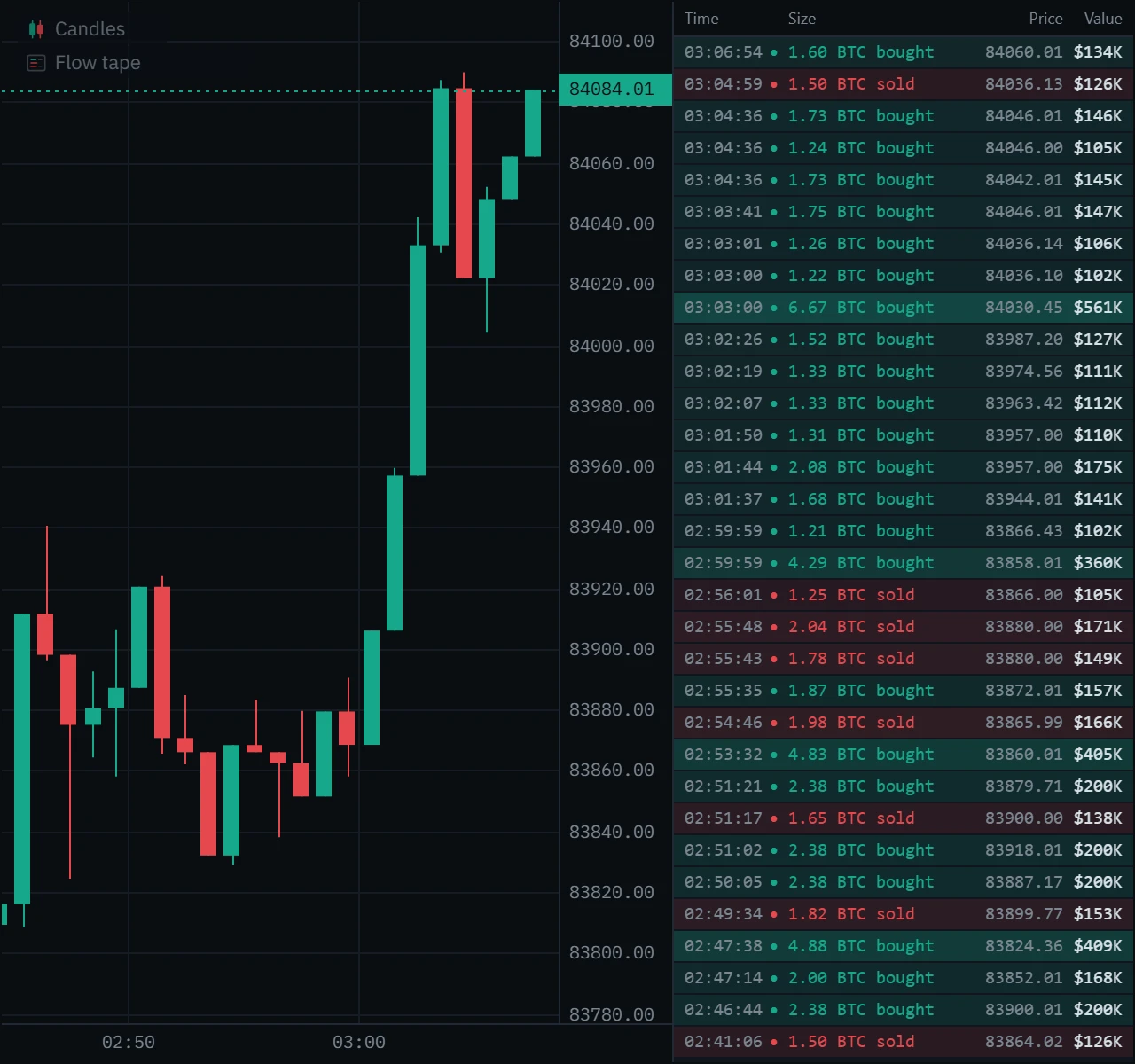
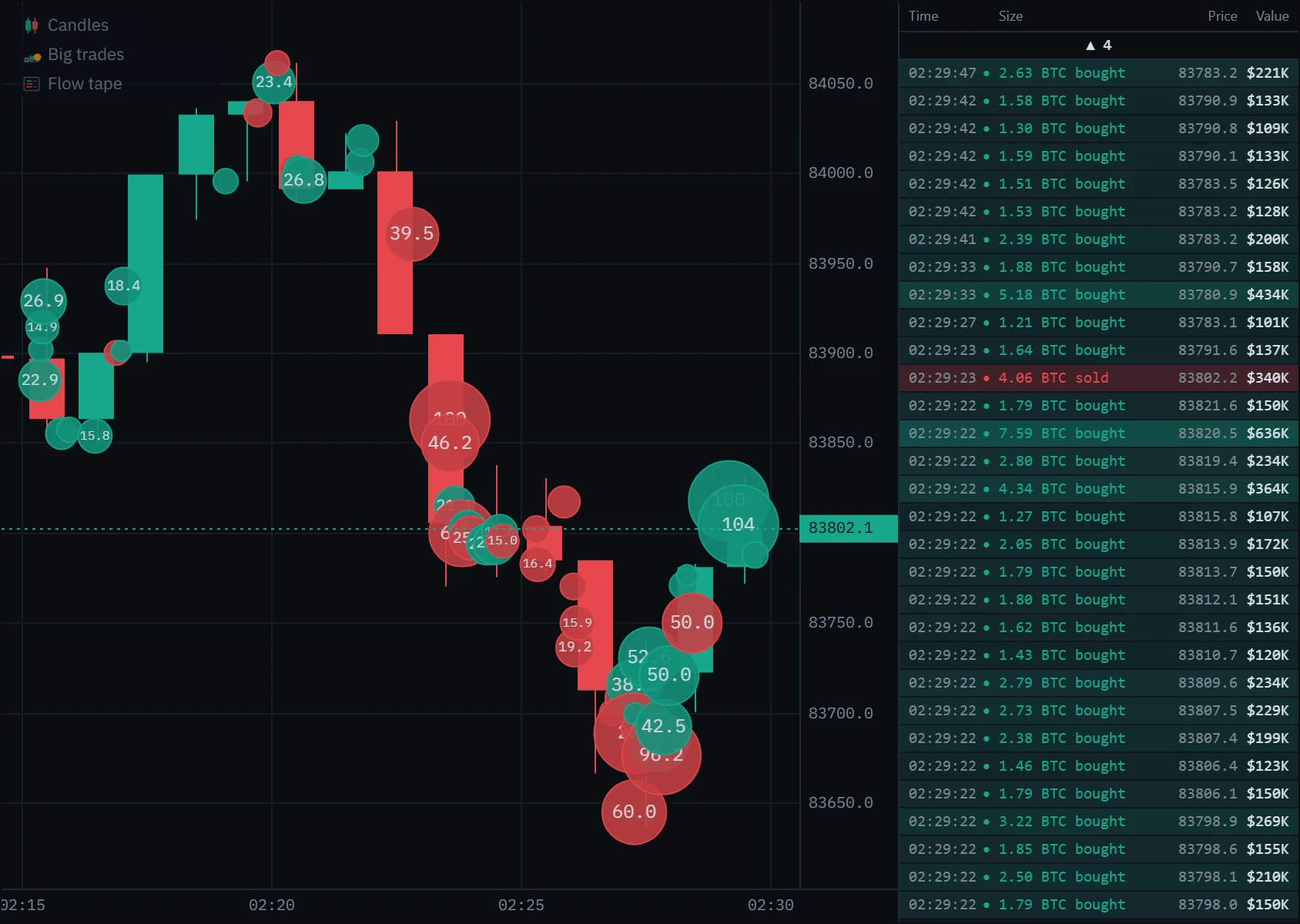
The tape docks beside the chart, newest print on top. Open each mark on the picture below.
What floor should you use?
A floor is right when each row is an event: a list that scrolls faster than you can read is time and sales again, and an empty one tells you nothing. How many prints clear a floor depends on the market and on the hour. We counted them on Binance, from the exchange’s own trade record, at 01:34 UTC on 7 October 2026, while Bitcoin was falling through 85,200 and longs were being liquidated. Each count is from that market’s last 5,000 trades: under five minutes of the Bitcoin perpetual, an hour of Dogecoin’s.
| Market | $10K | $25K | $100K | $250K | Largest print |
|---|---|---|---|---|---|
| Bitcoin perpetual | 11,156 | 7,143 | 2,137 | 708 | $7.27M |
| Bitcoin spot | 1,088 | 571 | 108 | 15 | $275K |
| Ether perpetual | 4,545 | 2,353 | 666 | 230 | $2.69M |
| Ether spot | 495 | 221 | 26 | 0 | $188K |
| Solana perpetual | 1,354 | 786 | 149 | 18 | $763K |
| Dogecoin perpetual | 263 | 98 | 1 | 0 | $188K |
- Bitcoin and Ether perpetuals: $100,000 on a quiet day, $250,000 or more when the market is moving.
- Bitcoin and Ether spot: $10,000 to $25,000. Spot prints are a fraction of the perpetual’s; at $100,000 a spot tape can sit empty for minutes.
- Altcoin perpetuals: $10,000 to $50,000, depending on the coin.
Type the floor rather than guessing: it is one setting, kept for every chart, and the list is rebuilt from the tape the chart already holds the moment you change it.
Flow tape patterns to look for
A row says that size traded, where, and which side was in a hurry. What it meant is decided by what price did next. Each pattern below is a question to ask at a level you already care about.
Several rows of the same colour stamped in the same second, each at a slightly worse price: one aggressive order taking every price in its way. The urgency is the signal. Someone paid the spread several times over rather than wait.
- Look for
- Same second, same side, stepping prices
- Read next
- Whether price holds beyond the last row
How to use the flow tape in trading
Set a floor you would notice
Start from the table above. If rows arrive faster than you can read them, raise it until each one is an event again.
Mark your levels first
A range edge, yesterday’s high, a level price has turned at. A big print in the middle of nowhere rarely means much.
Watch the tape as price arrives
Which colour shows up, how big, and how fast? A sweep through the level, a cascade, or large prints that price refuses to follow?
Confirm on the chart
The footprint shows the prices the size traded at, the delta panel whether it held to the close, and the DOM ladder what was resting there.
Decide where you are wrong
If you trade with the prints, the trade is wrong once price goes back through the price they traded at.
Flow tape, time & sales and big trades
Klustra has three ways to see large orders, and they answer different questions.
| Flow tape | Time & sales | Big trades bubbles | |
|---|---|---|---|
| What it lists | Single prints, as published | Grouped orders | Grouped orders |
| Floor | Dollars | Coins (or dollars) | Coins (or dollars) |
| Liquidations | In the same list | No | No (their own bubbles) |
| Where | A list beside the chart | A list beside the chart | On the chart |
| Best for | Exact prints and cascades, live | Whole orders, newest first | Where size traded in price |
Set it up in Klustra
Open the chart
Go to the chart and choose an exchange and instrument. A perpetual shows liquidations too. The flow tape is part of Pro.
Switch it on
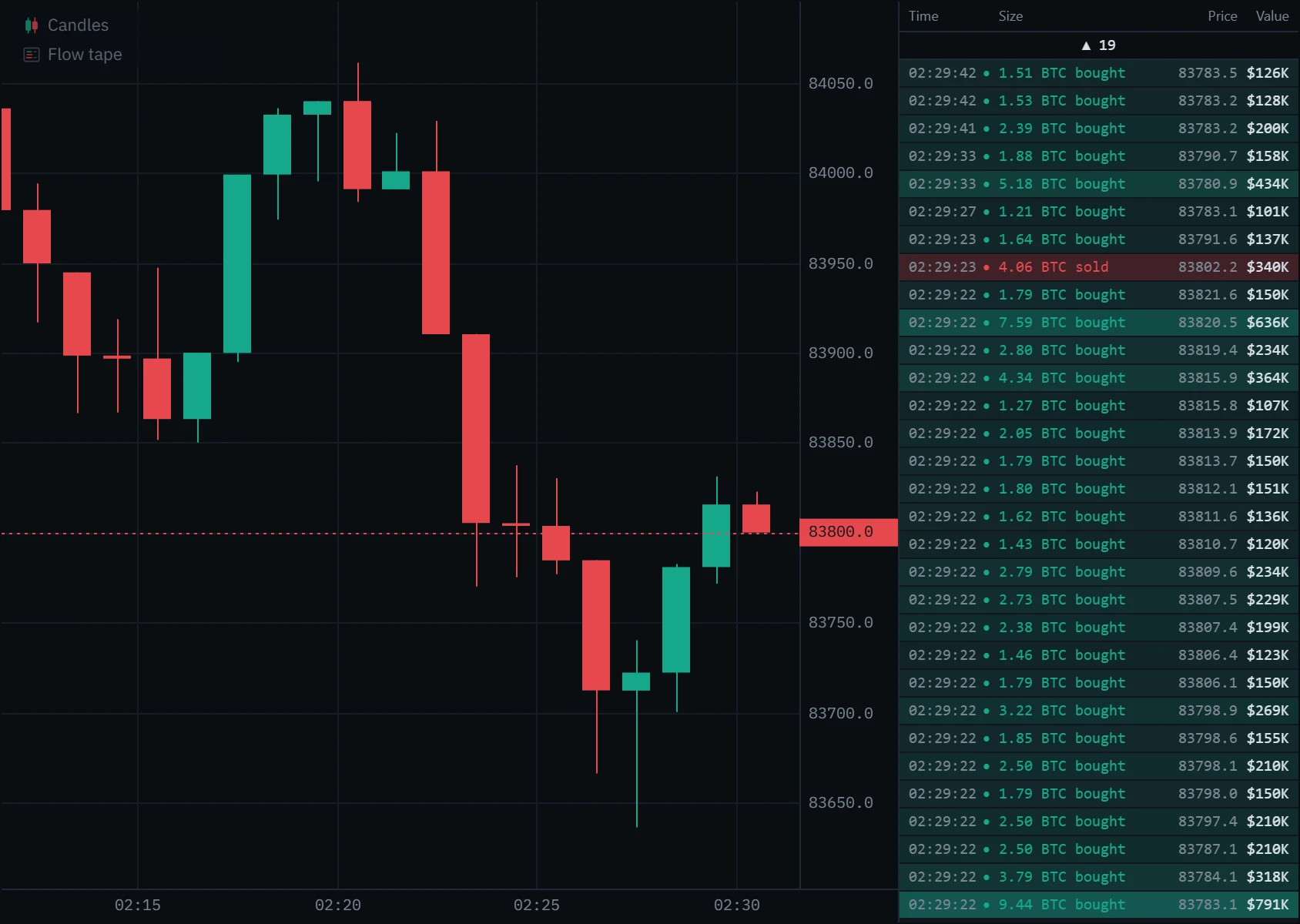
Open Indicators in the toolbar and pick Flow tape under Order flow. The tape fills with the prints already loaded, then keeps up live.
Set the floor
The gear beside Flow tape in the chart’s legend opens its settings. Type a Minimum order value; the list is rebuilt at once.
Scroll back
Scroll the list with the mouse wheel, drag it, or use the arrow and Page keys. While you read older rows they stay put; a bar at the top counts the newer prints above. Click it, scroll back up or press Home to return to the live tape.
On a phone
The tape docks under the chart. On a narrow panel or at a large text size it drops the price column and the words before it drops a figure; the value is always shown whole.
Every setting
| Setting | Default | Range | What it changes |
|---|---|---|---|
| Minimum order value ($) | $100,000 | $1,000 to $10,000,000 | The floor. Prints and liquidation cascades worth less are left out. Changing it rebuilds the list from the tape the chart holds. |
| Panel width | 260 | 190 to 420 | The panel’s width in pixels. Narrow panels drop the price column, then the words, before any figure. |
| Show large trades | On | On or off | Lists the prints over the floor. Off leaves a liquidations-only tape. |
| Show liquidations | On | On or off | Lists liquidation cascades over the floor. Only perpetuals on Binance, Bybit and OKX have them. |
| Show price column | On | On or off | Prints the price of each row. Off leaves time, size and value. |
Common mistakes and limits
- Reading one row as one trader. Exchanges do not say who placed an order. A row is one print; one order can be several rows, and on venues that publish each fill, many.
- Reading a buy as bullish. It means someone bought aggressively. Whether price gave way is the chart’s answer, not the tape’s.
- Keeping one floor for every market. $100,000 is busy on the Bitcoin perpetual and nearly silent on Bitcoin spot. Set it for the market you are on.
- Expecting every liquidation. Binance publishes at most one per symbol each second, and liquidations are only recorded while a chart on that perpetual is open.
- Expecting a tape during bar replay. A replay reads exchange candles and recorded order flow, not the live stream, so the flow tape is off until you return to live.
- Mixing venues. The tape is one exchange and one market at a time. Spot and perpetual are separate tapes, and so is each exchange.
Klustra and other tape tools
Time and sales is in every order-flow platform. Klustra’s runs in the browser with nothing to install, is filtered in dollars, and lists liquidations in the same tape on Binance, Bybit and OKX perpetuals. If you are coming from another platform, the comparisons go through what carries over and what does not: Klustra vs Exocharts and Klustra vs TradingLite.
Free and Pro
The flow tape is part of Pro, with the rest of the live book and tape tools. The chart, the footprint and the order-flow panels inside it stay free.
| Feature | Free | Pro |
|---|---|---|
| Flow tape | Not included | Included |
| Big trades | Not included | Included |
| DOM ladder | Not included | Included |
| Book heatmap | Not included | Included |
| Speed of tape | Not included | Included |
| Price and order-flow alerts in the browser | Not included | Included |
| Footprint chart (bid × ask) | Included | Included |
| Order-flow history | Last 6 hours | Deep archive, where covered |
Questions
What is a flow tape?
A time and sales list filtered by dollar value. Klustra’s flow tape lists every trade worth more than a floor you choose, and the liquidations exchanges publish on perpetuals, newest first, with the time, size, price and value of each, coloured by the side that crossed the spread.
What is time and sales in crypto?
The exchange’s public record of its trades: price, size, time and which side was the aggressor, for every print. Reading it live is called tape reading. On a busy market it runs to tens of thousands of trades an hour, which is why a filter matters.
How do you read the tape?
Set a floor so that each row is an event, mark the levels you care about, and watch which side prints size as price reaches them: a sweep through the level, a liquidation cascade, or large prints that price refuses to follow. Then confirm on the chart.
Why filter by dollar value instead of size?
A size filter means something different on every symbol and drifts as price moves. A dollar floor is the same amount of money everywhere, so $100,000 is a large print on any market and stays one as price changes.
What does a liquidation row mean?
The exchange closed one or more leveraged positions by force. “Long liquidated” is a forced sell, drawn red; “Short liquidated” a forced buy, drawn green. Same-side liquidations within half a second of the first are shown as one row, with their total value.
Why does the tape not show every liquidation?
Binance publishes at most one liquidation per symbol each second, so in a fast cascade some forced orders never reach a public feed. Klustra also records them only while a chart on that perpetual is open, and keeps them for a day.
Is one row one order?
Not always. On Binance one row is the fills of one aggressive order at one price, so an order that sweeps several prices prints several rows. Big trades groups those rows into the orders behind them.
Why is my flow tape empty?
Nothing on that market has traded above your floor since the chart opened, and none of the history it loaded did either. Spot markets print far smaller than perpetuals: lower the floor to $10,000 or $25,000.
Can I scroll back through the tape?
Yes. The panel keeps the 200 newest rows: scroll with the mouse wheel, drag, or use the arrow and Page keys. The rows you are reading stay put while new prints land above them.
Is the flow tape free?
No. The flow tape, big trades, the DOM ladder, speed of tape and the book heatmap are part of Pro. The footprint, delta, CVD and imbalances are free.
Related tools
See it on a live market.
Open a supported market and switch the tool on. The footprint, delta, CVD and imbalances are free, with no account.
Order flow shows what traded, not what will trade next. Nothing on this page is financial advice, and trading carries a real risk of loss.